Templates · Success and confirmation screens · Food app · Agave
Agave Order placed screen
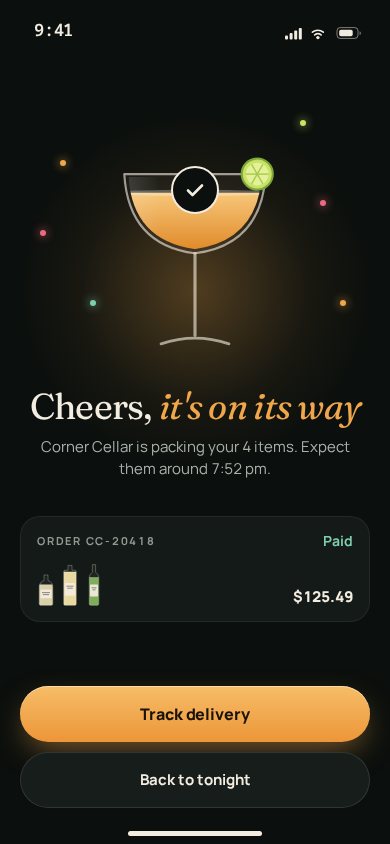
A success screen from Agave, a cocktails and home bar app template in a Dark-first style. Screen 17 of 25.
Agave is a complete home bar app: welcome, palate setup and an age checked sign up, a Tonight home that knows what you can pour, explore and collections, a recipe with a labelled pour diagram, a guided shake timer and a masterclass player, your bottle shelf with fill levels, a bottle page, label scanning, what you can make, a party batch calculator, restocking with checkout, a delivery map and confirmation, a tasting log and journal, drinking insights with mindful units, a Reserve plan, notifications, profile and settings. Near black and cream with mezcal amber, hibiscus and jade.
| Detail | Value |
|---|---|
| Screen type | Success |
| App | Agave: Cocktails and home bar |
| Category | Food |
| Design language | Dark-first, dark |
| Type | Fraunces for headings, Manrope for text |
| Colours | #0b0f0d background, #141a17 surface, #f3ece0 text, #8f9a92 text-muted, #f0a64a accent, #1a1207 accent-contrast, #ec6a7e secondary, #7fcfae success, rgba(243,236,224,0.08) border |
What this screen says
- Cheers, it's on its way
- Corner Cellar is packing your 4 items. Expect them around 7:52 pm.
- Order CC-20418 Paid
- Track delivery
- Back to tonight
Around it in Agave
More success and confirmation screens
- Mart Exit pass: Supermarket app with loyalty and scan and go
- Rescue Reserved: Surprise bags of surplus food
- Omakase Confirmed: Chef's counter reservations
- Lunchbox Order placed: School lunch planner for parents
- Crock At peak: Fermentation and sourdough starter log
- Curbside Order placed: Street food and food truck finder
- Forage Order placed: Farmers market and veg box
- Ember Cook complete: Smoker and grill thermometer
- Steep Note saved: Tea brewing and tasting notes
- Brigade Order sent: Restaurant kitchen and line ops
- Nibs Order placed: Food allergy and label scanner
- Ladle Cooked: Recipes and meal planning
What makes a good confirmation screen
- Confirm in the headline. "Payment sent", "Table booked for Friday at 8" or "Lesson complete" in plain words, with a clear success colour or icon.
- Repeat the key details. Amount, date, reference number or score, so people do not need to check elsewhere that the right thing happened.
- Say what happens next. When the order arrives, when the money lands, when the next lesson unlocks.
- Offer the next step. Track the order, add to calendar, share, or start the next lesson. One primary action and a way back home.
The full confirmation screen guide and every example
Remix Agave free: describe your own app and it is drawn in this design. Or get its files from $10: Figma, React Native, SwiftUI, Flutter and HTML.