Templates · Onboarding screens · Finance app · Payly
Payly Language screen
An onboarding screen from Payly, a finance app template in a Playful style. Screen 2 of 25.
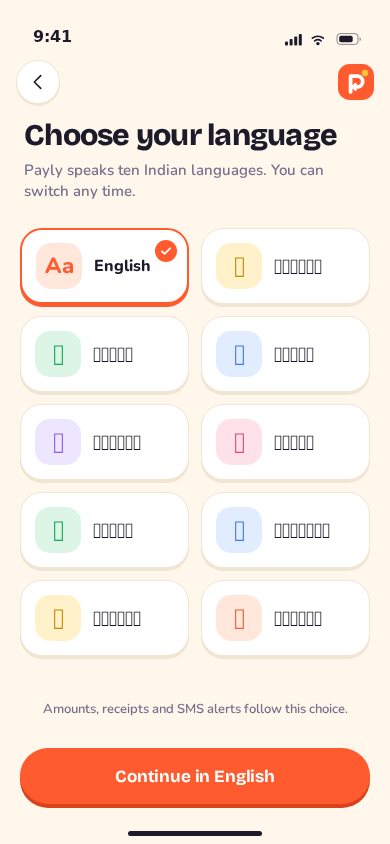
Payly is a complete everyday payments app for India: welcome, language, mobile number and OTP, a home with money transfers, people and bills, a QR scanner, an amount pad, the UPI PIN pad and a payment receipt, contacts and a payment chat, mobile recharge and plans, bill categories and an electricity bill, history and a transaction ticket, bank accounts with a balance check, monthly spends, scratch card rewards, a Club plan, notifications, profile and settings. Warm cream with chilli orange, marigold and leaf green.
| Detail | Value |
|---|---|
| Screen type | Onboarding |
| App | Payly: UPI payments, recharges and bills |
| Category | Finance |
| Design language | Playful, light |
| Type | Bricolage Grotesque for headings, Nunito for text |
| Colours | #fff7ec background, #ffffff surface, #1d1b2a text, #77708a text-muted, #ff5b2e accent, #ffffff accent-contrast, #ffc23c secondary, #f1e5d3 border, #e5383b danger |
What this screen says
- Choose your language
- Payly speaks ten Indian languages. You can switch any time.
- Aa English
- अ हिन्दी
- म मराठी
- த தமிழ்
- త తెలుగు
- ಕ ಕನ್ನಡ
- অ বাংলা
- ગ ગુજરાતી
- മ മലയാളം
- ਪ ਪੰਜਾਬੀ
- Amounts, receipts and SMS alerts follow this choice.
- Continue in English
Around it in Payly
More onboarding screens
- Storefront Welcome: Run your online store
- Bastion Welcome: Everyday banking from a big bank
- Later Welcome: Buy now, pay in four
- Standing Welcome: Credit score and reports
- Accrue Welcome: Retirement and pension planner
- Levy Welcome: Taxes for freelancers
- Bullion Welcome: Gold and silver savings
- Wage Welcome: Get paid as you work
- Keystone Welcome: Mortgage and home loan tracker
- Rebate Welcome: Cashback card and rewards
- Aegis Welcome: Insurance policies and claims
- Till Welcome: Card reader and sales for small shops
Every finance app onboarding screen
What makes a good onboarding screen
- One idea per screen. Each screen should say one thing in a headline people can read in a second. If a screen needs a paragraph, it is doing too much.
- Personalise with a purpose. Ask a question only if the answer changes what people see next, like a goal, a level or an interest. Then show that the answer mattered.
- Explain permissions before asking. Show your own screen saying why you need notifications, location or the camera before the system prompt. People who understand the reason are more likely to allow it.
- Let people skip. A visible skip or "I'll do this later" respects returning users and the impatient. Make sure skipping still lands them somewhere useful.
The full onboarding screen guide and every example
Remix Payly free: describe your own app and it is drawn in this design. Or get its files from $10: Figma, React Native, SwiftUI, Flutter and HTML.