Templates · Onboarding screens · Finance app · Aegis
Aegis Welcome screen
An onboarding screen from Aegis, an insurance policies and claims app template in a Clinical style. Screen 1 of 25.
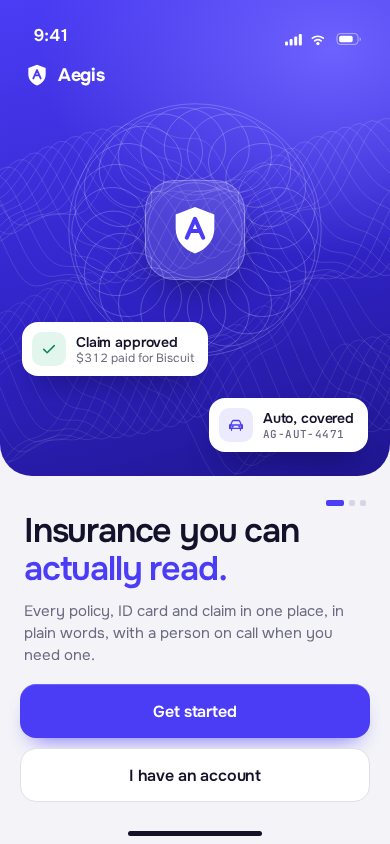
Aegis is a complete insurance app: welcome, sign in and a one time code, a home with every policy and the open claim, policies, an auto policy with limits and deductibles, a digital ID card, an Am I covered search, claims, a guided claim flow (what happened, incident details, damage photos, review, filed), a live claim tracker, roadside help with a tow truck on the map, repair shops, a home quote with checkout, billing, insights, an Aegis Plus plan, notifications, account and settings. Lavender white and white with deep indigo, ink, green for covered and amber for in review.
| Detail | Value |
|---|---|
| Screen type | Onboarding |
| App | Aegis: Insurance policies and claims |
| Category | Finance |
| Design language | Clinical, light |
| Type | JetBrains Mono for headings, Onest for text |
| Colours | #f4f4f8 background, #ffffff surface, #14122b text, #6b6a80 text-muted, #4b3df5 accent, #ffffff accent-contrast, #0b8556 secondary, #e6e5ef border, #c93035 danger |
What this screen says
- Aegis
- Claim approved$312 paid for Biscuit
- Auto, coveredAG-AUT-4471
- Insurance you can actually read.
- Every policy, ID card and claim in one place, in plain words, with a person on call when you need one.
- Get started
- I have an account
Around it in Aegis
More onboarding screens
- Halden Welcome: Premium neobank
- Billable Welcome: Time tracking and invoices, kept like a ledger
- Lease Welcome: Your tenancy, drawn to plan
- Claim Welcome: Expenses, filed like a till receipt
- Tally Welcome: Monthly budgeting
- Divvy Welcome: Split bills with friends
- Ticker Welcome: Stock investing
- Burrow Welcome: Shared savings pots
- Remit Welcome: International money transfer
- Piggy Welcome: Pocket money for kids
- Settle Welcome: Bill payments and banking
- Fathom Welcome: Crypto wallet
Every finance app onboarding screen
What makes a good onboarding screen
- One idea per screen. Each screen should say one thing in a headline people can read in a second. If a screen needs a paragraph, it is doing too much.
- Personalise with a purpose. Ask a question only if the answer changes what people see next, like a goal, a level or an interest. Then show that the answer mattered.
- Explain permissions before asking. Show your own screen saying why you need notifications, location or the camera before the system prompt. People who understand the reason are more likely to allow it.
- Let people skip. A visible skip or "I'll do this later" respects returning users and the impatient. Make sure skipping still lands them somewhere useful.
The full onboarding screen guide and every example
Remix Aegis free: describe your own app and it is drawn in this design. Or get its files from $10: Figma, React Native, SwiftUI, Flutter and HTML.