Templates · Sign in and sign up screens · Finance app · Payly
Payly Sign in screen
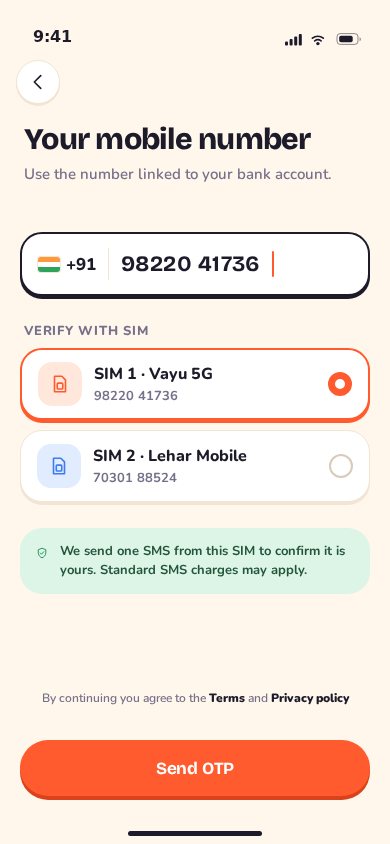
A sign in screen from Payly, a finance app template in a Playful style. Screen 3 of 25.
Payly is a complete everyday payments app for India: welcome, language, mobile number and OTP, a home with money transfers, people and bills, a QR scanner, an amount pad, the UPI PIN pad and a payment receipt, contacts and a payment chat, mobile recharge and plans, bill categories and an electricity bill, history and a transaction ticket, bank accounts with a balance check, monthly spends, scratch card rewards, a Club plan, notifications, profile and settings. Warm cream with chilli orange, marigold and leaf green.
| Detail | Value |
|---|---|
| Screen type | Sign in |
| App | Payly: UPI payments, recharges and bills |
| Category | Finance |
| Design language | Playful, light |
| Type | Bricolage Grotesque for headings, Nunito for text |
| Colours | #fff7ec background, #ffffff surface, #1d1b2a text, #77708a text-muted, #ff5b2e accent, #ffffff accent-contrast, #ffc23c secondary, #f1e5d3 border, #e5383b danger |
What this screen says
- Your mobile number
- Use the number linked to your bank account.
- Verify with SIM
- SIM 1 · Vayu 5G98220 41736
- SIM 2 · Lehar Mobile70301 88524
- We send one SMS from this SIM to confirm it is yours. Standard SMS charges may apply.
- By continuing you agree to the Terms and Privacy policy
- Send OTP
Around it in Payly
More sign in and sign up screens
- Lease Sign in: Your tenancy, drawn to plan
- Claim Sign in: Expenses, filed like a till receipt
- Tally Sign in: Monthly budgeting
- Divvy Sign in: Split bills with friends
- Ticker Sign in: Stock investing
- Burrow Sign in: Shared savings pots
- Remit Sign in: International money transfer
- Piggy Sign in: Pocket money for kids
- Settle Sign in: Bill payments and banking
- Fathom Sign in: Crypto wallet
- Marigold Sign in: Mobile banking
- Zentra Sign in: Crypto trading
Every finance app sign in screen
What makes a good login screen
- Offer the fastest option first. Sign in with Apple, Google or a passkey takes one tap. If you support them, put them above the email form. Apple asks apps that use a third-party login like Google to also offer an equivalent privacy-focused option, such as Sign in with Apple.
- Separate sign in from sign up clearly. Use different headings and buttons, and a clear link to switch. People who already have an account should never end up creating a second one by accident.
- Use the right keyboard and autofill. Email fields should open the email keyboard and support password managers and one-time code autofill. Small details, big difference in how many people get through.
- Write errors that help. "That password doesn't match this email" is better than "Error 401". Keep what people typed so they only fix the part that was wrong.
The full login screen guide and every example
Remix Payly free: describe your own app and it is drawn in this design. Or get its files from $10: Figma, React Native, SwiftUI, Flutter and HTML.