Templates · Onboarding screens · Finance app · Bastion
Bastion Welcome screen
An onboarding screen from Bastion, a finance app template in an Enterprise style. Screen 1 of 25.
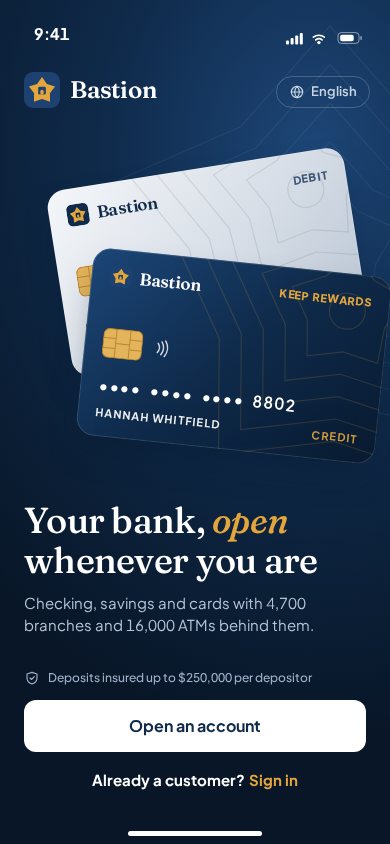
Bastion is a complete big bank app: welcome, sign in, a one time code, an accounts overview, checking, savings and credit card pages, a transaction, the pay and transfer hub, a transfer with review and confirmation, send to a phone or email, bill pay, check deposit with a capture camera, card controls, spending insights, statements, a branch and ATM finder, alerts, secure messages, the Citadel premium tier, profile and settings. Cool grey and white with harbour navy, rampart gold and a quiet green for money in.
| Detail | Value |
|---|---|
| Screen type | Onboarding |
| App | Bastion: Everyday banking from a big bank |
| Category | Finance |
| Design language | Enterprise, light |
| Type | Fraunces for headings, Plus Jakarta Sans for text |
| Colours | #eef1f5 background, #ffffff surface, #0c1b2e text, #5b6879 text-muted, #0f2a4a primary, #e3a63c accent, #13805f success, #2f6f9f secondary, #dde3ea border, #c2412d danger |
What this screen says
- Bastion
- English
- BastionDebit
- •••• •••• •••• 5531
- HANNAH WHITFIELD DEBIT
- BastionKeep Rewards
- •••• •••• •••• 8802
- HANNAH WHITFIELD CREDIT
- Your bank, open whenever you are
- Checking, savings and cards with 4,700 branches and 16,000 ATMs behind them.
- Deposits insured up to $250,000 per depositor
- Open an account
- Already a customer?Sign in
Around it in Bastion
More onboarding screens
- Keel Welcome: Corporate cards and spend controls
- Giftly Welcome: Gift cards, sent and stored
- Zap Welcome: Pay friends with a note
- Billfold Welcome: Cards, passes and tickets wallet
- Payly Welcome: UPI payments, recharges and bills
- Crest Welcome: Credit card bills and rewards
- Storefront Welcome: Run your online store
- Later Welcome: Buy now, pay in four
- Standing Welcome: Credit score and reports
- Accrue Welcome: Retirement and pension planner
- Levy Welcome: Taxes for freelancers
- Bullion Welcome: Gold and silver savings
Every finance app onboarding screen
What makes a good onboarding screen
- One idea per screen. Each screen should say one thing in a headline people can read in a second. If a screen needs a paragraph, it is doing too much.
- Personalise with a purpose. Ask a question only if the answer changes what people see next, like a goal, a level or an interest. Then show that the answer mattered.
- Explain permissions before asking. Show your own screen saying why you need notifications, location or the camera before the system prompt. People who understand the reason are more likely to allow it.
- Let people skip. A visible skip or "I'll do this later" respects returning users and the impatient. Make sure skipping still lands them somewhere useful.
The full onboarding screen guide and every example
Remix Bastion free: describe your own app and it is drawn in this design. Or get its files from $10: Figma, React Native, SwiftUI, Flutter and HTML.