Templates · Detail screens · Social app · Parrot
Parrot Group chat screen
A detail screen from Parrot, a social app template in a Minimal style. Screen 7 of 25.
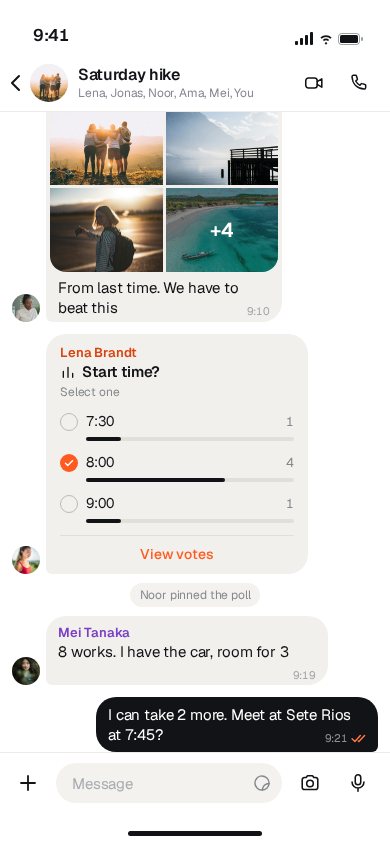
Parrot is a complete everyday messenger: welcome, phone number and code, profile setup, a chat list with filters, pinned and archived chats, a one to one chat with photos, a voice note and replies, a group chat with a poll, contact and group info, a new chat picker, a new group, search across messages, shared media, the camera, live location, voice and video calls, a call log, status updates and a story, sending money in a chat with a receipt, a Plus plan, storage and data, and settings. White and paper grey with ink and a single vermilion accent.
| Detail | Value |
|---|---|
| Screen type | Detail |
| App | Parrot: Private messaging, groups and calls |
| Category | Social |
| Design language | Minimal, light |
| Type | Instrument Serif for headings, Geist for text |
| Colours | #ffffff background, #f3f2ee surface, #121316 text, #85888f text-muted, #ff5a1f accent, #ffffff accent-contrast, #121316 secondary, #ecebe7 border, #e5352b danger |
What this screen says
- Saturday hike
- Lena, Jonas, Noor, Ama, Mei, You
- Jonas Weber Sintra on Saturday: 19°, sunny until 3pm9:02
- Ama Mensah
- From last time. We have to beat this9:10
- Lena Brandt
- Start time?
- Select one
- View votes
- Noor pinned the poll
- Mei Tanaka 8 works. I have the car, room for 39:19
- I can take 2 more. Meet at Sete Rios at 7:45?9:21
- Message
Around it in Parrot
More detail screens
- Commons Post: Friends, groups and events
- Tether Member: Family location and safety
- Facet Contact: Video calls with family and friends
- Stoop Lost cat: Neighbourhood noticeboard
- Aura Friend aura: Moods with close friends
- Kindly Opportunity: Volunteering near you
- Cohort Mentor: Alumni and mentor network
- Kin Moment: Private family circle
- Confetti Invite: Party invites and RSVPs
- Ripple Note: Voice notes social
- Duo Answers: An app for two
- Soapbox Motion: Weekly debates and polls
Every social app detail screen
What makes a good detail screen
- Lead with what identifies the item. A large image or title, the price or status, and the key facts at the top. People should know they are in the right place at a glance.
- Keep the main action visible. A sticky bottom button for Add to cart, Book or Play stays reachable while people scroll through details.
- Order information by importance. The facts that decide the choice come first; reviews, specifications and fine print further down.
- Use progressive disclosure. Long descriptions, specifications and policies can expand on tap rather than filling the screen.
The full detail screen guide and every example
Remix Parrot free: describe your own app and it is drawn in this design. Or get its files from $10: Figma, React Native, SwiftUI, Flutter and HTML.