Templates · Detail screens · Productivity app · Parley
Parley Team chat screen
A detail screen from Parley, a team messenger app template in a Dark-first style. Screen 8 of 25.
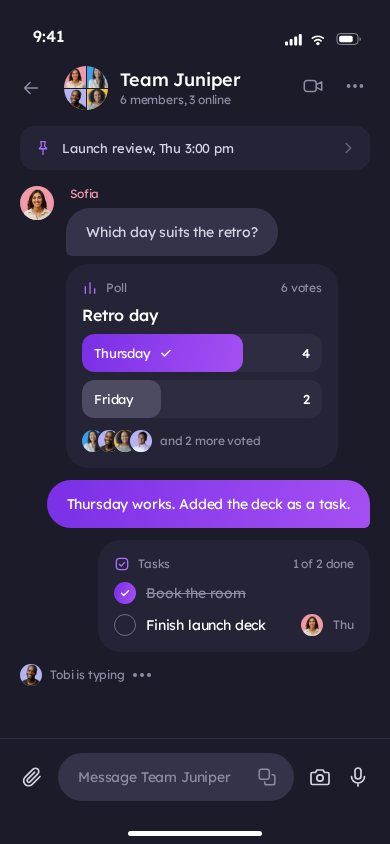
Parley is a complete team messenger: welcome, sign in and a code, a home with a status row and direct and team chats, search, statuses, a one to one chat with voice notes, a team chat with a poll and a shared task, creating a group with an admin and invited members, group info, channels, shared tasks, polls, calls, a video meeting, a weekly team pulse, contacts, profile, notifications, a plan and settings. Dark indigo charcoal with one violet and portraits on flat coloured circles.
| Detail | Value |
|---|---|
| Screen type | Detail |
| App | Parley: Team messenger |
| Category | Productivity |
| Design language | Dark-first, dark |
| Type | Lexend |
| Colours | #1c1b29 background, #252437 surface, #ffffff text, #8d8ca3 text-muted, #8b3df0 accent, #ffffff accent-contrast, #f6c443 secondary, #34334a border, #f0464f danger |
What this screen says
- Team Juniper
- 6 members, 3 online
- Launch review, Thu 3:00 pm
- Sofia
- Which day suits the retro?
- Poll6 votes
- Retro day
- Thursday 4
- Friday 2
- and 2 more voted
- Thursday works. Added the deck as a task.
- Tasks1 of 2 done
- Book the room
- Finish launch deck
- Thu
- Tobi is typing
- Message Team Juniper
Around it in Parley
More detail screens
- Shortlist Job: Job search and application tracker
- Docket Task: Task and sprint planner
- Kanso Project: Tasks, calendar and chat
- Margin Notebook: AI note taking
- Aide Meeting brief: Executive AI assistant
- Juno Chat: AI chat assistant
- Opal Project: Studio dashboard
- Jot Note: Quick notes and checklists
- Chrono City: World clock, timers and stopwatch
- Frontdesk Ticket: Customer support inbox
- Campaign: Email marketing campaigns
- Outpost Previews: Schedule social posts
Every productivity app detail screen
What makes a good detail screen
- Lead with what identifies the item. A large image or title, the price or status, and the key facts at the top. People should know they are in the right place at a glance.
- Keep the main action visible. A sticky bottom button for Add to cart, Book or Play stays reachable while people scroll through details.
- Order information by importance. The facts that decide the choice come first; reviews, specifications and fine print further down.
- Use progressive disclosure. Long descriptions, specifications and policies can expand on tap rather than filling the screen.
The full detail screen guide and every example
Remix Parley free: describe your own app and it is drawn in this design. Or get its files from $10: Figma, React Native, SwiftUI, Flutter and HTML.