Templates · Success and confirmation screens · Productivity app · Pageview
Pageview Alert saved screen
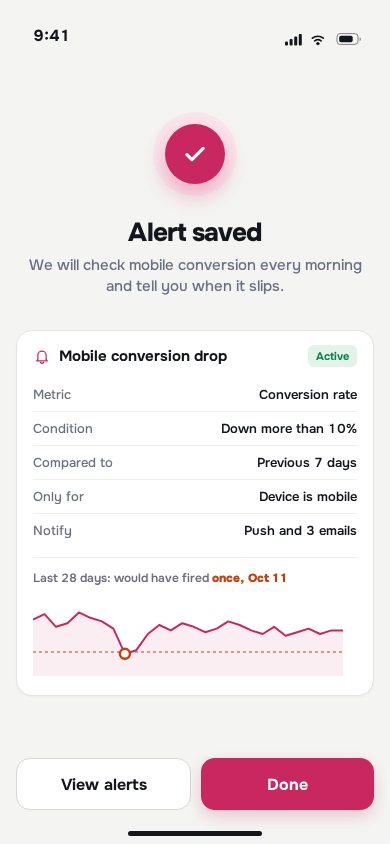
A success screen from Pageview, a website analytics app template in an Enterprise style. Screen 21 of 25.
Pageview is a complete website analytics app for an online plant shop: welcome, sign in and connecting the site with a tracking snippet, a home overview with metric cards and a period comparison chart, realtime visitors with minute bars and a live event stream, a report library, acquisition by channel and a channel's sources, pages and a page in depth, events and key events, audience by country and device, weekly retention cohorts, a checkout funnel, segment comparison, a custom date range, search, alerts with a new alert form and its confirmation, notifications, a Pro plan, account and settings. Pale stone and white with berry, ocean, saffron and sage series colours.
| Detail | Value |
|---|---|
| Screen type | Success |
| App | Pageview: Website analytics |
| Category | Productivity |
| Design language | Enterprise, light |
| Type | JetBrains Mono for headings, Onest for text |
| Colours | #f4f5f2 background, #ffffff surface, #13161c text, #6a7080 text-muted, #c8285f accent, #fbe7ee accent-tint, #16181f secondary, #e3e5df border, #2f6fb0 chart-2, #e09a2b chart-3, #4f9a74 chart-4, #11804a success, #c2410c danger |
What this screen says
- Alert saved
- We will check mobile conversion every morning and tell you when it slips.
- Mobile conversion dropActive
- MetricConversion rate
- ConditionDown more than 10%
- Compared toPrevious 7 days
- Only forDevice is mobile
- NotifyPush and 3 emails
- Last 28 days: would have fired once, Oct 11
- View alerts
- Done
Around it in Pageview
More success and confirmation screens
- Unplug Session done: Screen time blocker
- Streak Day complete: Small days, long chains
- Deskly Checked in: Hybrid office booking
- Pomo Session done: Focus timer
- Postbox Message sent: Email for busy teams
- Daybook Invite sent: Calendar and planner
- Scanly Exported: Document scanner
- Keyring Item saved: Password manager
- Rota Shift summary: Shift scheduling for hourly teams
- Inkwell Entry saved: Daily journal
- Shortlist Application sent: Job search and application tracker
- Parley Group created: Team messenger
Every productivity app success screen
What makes a good confirmation screen
- Confirm in the headline. "Payment sent", "Table booked for Friday at 8" or "Lesson complete" in plain words, with a clear success colour or icon.
- Repeat the key details. Amount, date, reference number or score, so people do not need to check elsewhere that the right thing happened.
- Say what happens next. When the order arrives, when the money lands, when the next lesson unlocks.
- Offer the next step. Track the order, add to calendar, share, or start the next lesson. One primary action and a way back home.
The full confirmation screen guide and every example
Remix Pageview free: describe your own app and it is drawn in this design. Or get its files from $10: Figma, React Native, SwiftUI, Flutter and HTML.