Templates · Success and confirmation screens · Productivity app · Daybook
Daybook Invite sent screen
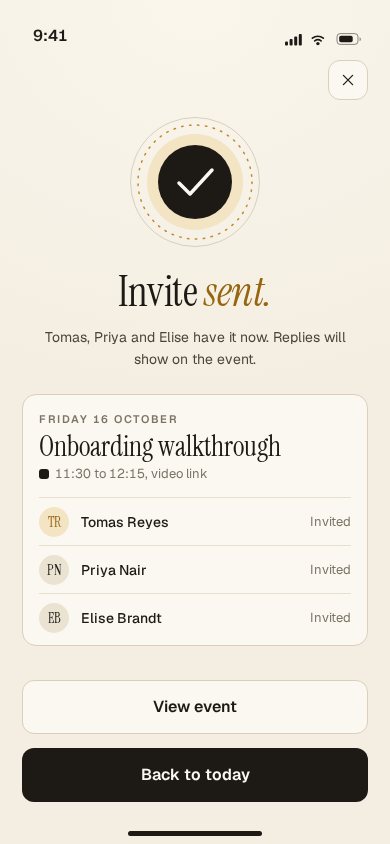
A success screen from Daybook, a calendar and planner app template in a Minimal style. Screen 13 of 25.
Daybook is a complete calendar and planner: welcome, sign in, a code and connecting calendars, a today page with what is next, day, week and month views, an event with guests and replies, new event, find a time across people, search, booking links with availability and a guest booking page, tasks, time insights, notifications, a Plus plan, profile and settings. Work is ink, personal is ochre and focus time is hatched, so a week reads at a glance without a rainbow.
| Detail | Value |
|---|---|
| Screen type | Success |
| App | Daybook: Calendar and planner |
| Category | Productivity |
| Design language | Minimal, light |
| Type | Geist |
| Colours | #f4eee2 background, #fbf8f1 surface, #1d1a15 text, #7d7466 text-muted, #c4892a accent, #1d1a15 accent-contrast, #ebe3d2 secondary, #d9cfbb border, #b5452c danger |
What this screen says
- Invite sent.
- Tomas, Priya and Elise have it now. Replies will show on the event.
- Friday 16 October
- Onboarding walkthrough
- 11:30 to 12:15, video link
- TR
- Tomas Reyes
- Invited
- PN
- Priya Nair
- EB
- Elise Brandt
- View event
- Back to today
Around it in Daybook
More success and confirmation screens
- Quill Upgraded: Docs, wikis and databases in one workspace
- Tandem Channel created: Team chat, channels and huddles
- Shipyard Cycle closed: Issue tracking for product teams
- Canvas Upgraded: Design files and comments on mobile
- Merged: Code, pull requests and reviews
- Query Pro unlocked: AI answers with sources
- Glossa Pro unlocked: Translate text, voice and camera
- Layout Saved: Design anything from templates
- Tick Pro is on: To-do lists and reminders
- Beacon Lost mode on: Find your devices and people
- Staffroom Request sent: HR, payslips and time off
- Slot Confirmed: Booking links and meeting scheduling
Every productivity app success screen
What makes a good confirmation screen
- Confirm in the headline. "Payment sent", "Table booked for Friday at 8" or "Lesson complete" in plain words, with a clear success colour or icon.
- Repeat the key details. Amount, date, reference number or score, so people do not need to check elsewhere that the right thing happened.
- Say what happens next. When the order arrives, when the money lands, when the next lesson unlocks.
- Offer the next step. Track the order, add to calendar, share, or start the next lesson. One primary action and a way back home.
The full confirmation screen guide and every example
Remix Daybook free: describe your own app and it is drawn in this design. Or get its files from $10: Figma, React Native, SwiftUI, Flutter and HTML.