Templates · Success and confirmation screens · Productivity app · Keyring
Keyring Item saved screen
A success screen from Keyring, a password manager app template in a Dark-first style. Screen 13 of 25.
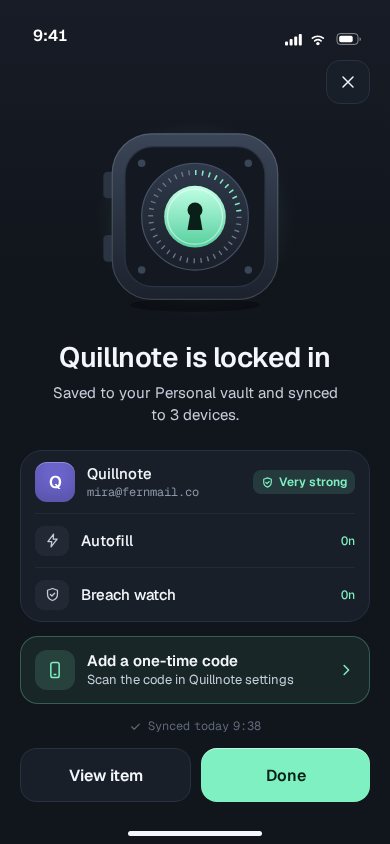
Keyring is a complete password manager: welcome, sign in, a master password with a strength meter, a recovery kit, passcode unlock, the vault home, search, every login, a login with its one-time code and history, new items, a password generator, cards, secure notes, a security score with weak, reused and breached passwords, a breach alert, autofill setup, shared vaults and sharing an item, alerts, a Plus plan, profile and settings. Mint means safe, apricot means weak and coral means breached.
| Detail | Value |
|---|---|
| Screen type | Success |
| App | Keyring: Password manager |
| Category | Productivity |
| Design language | Dark-first, dark |
| Type | Geist |
| Colours | #11151c background, #191f29 surface, #f3f6fa text, #8c97a8 text-muted, #7ef0c1 accent, #0a1f18 accent-contrast, #a7b4ff secondary, #283140 border, #ff7d7d danger |
What this screen says
- Quillnote is locked in
- Saved to your Personal vault and synced to 3 devices.
- Quillnote
- mira@fernmail.co
- Very strong
- Autofill
- On
- Breach watch
- Add a one-time code
- Scan the code in Quillnote settings
- Synced today 9:38
- View item
- Done
Around it in Keyring
More success and confirmation screens
- Bench Job posted: Freelance marketplace
- Convene Call ended: Video meetings
- Unplug Session done: Screen time blocker
- Streak Day complete: Small days, long chains
- Deskly Checked in: Hybrid office booking
- Pomo Session done: Focus timer
- Postbox Message sent: Email for busy teams
- Daybook Invite sent: Calendar and planner
- Scanly Exported: Document scanner
- Rota Shift summary: Shift scheduling for hourly teams
- Inkwell Entry saved: Daily journal
- Shortlist Application sent: Job search and application tracker
Every productivity app success screen
What makes a good confirmation screen
- Confirm in the headline. "Payment sent", "Table booked for Friday at 8" or "Lesson complete" in plain words, with a clear success colour or icon.
- Repeat the key details. Amount, date, reference number or score, so people do not need to check elsewhere that the right thing happened.
- Say what happens next. When the order arrives, when the money lands, when the next lesson unlocks.
- Offer the next step. Track the order, add to calendar, share, or start the next lesson. One primary action and a way back home.
The full confirmation screen guide and every example
Remix Keyring free: describe your own app and it is drawn in this design. Or get its files from $10: Figma, React Native, SwiftUI, Flutter and HTML.