Templates · Settings screens · Travel app · Hollow
Hollow Settings screen
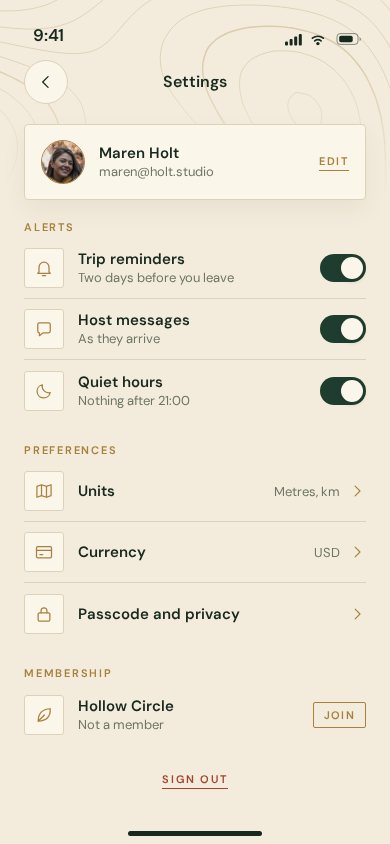
A settings screen from Hollow, a cabin and boutique stays app template in a Luxury style. Screen 25 of 25.
Hollow is a complete stays app: welcome, sign in and a code, an explore home with tall cabin cards, search, results, a contour map with price pins, a stay page, reviews, dates, guests, checkout and a booked screen, trips and a trip with arrival details, a host guidebook and a trail with its elevation profile, inbox and host chat, wishlists, a nights away dashboard, a membership, notifications, profile and settings. Forest green, cream and one brass throughout.
| Detail | Value |
|---|---|
| Screen type | Settings |
| App | Hollow: Cabin and boutique stays |
| Category | Travel |
| Design language | Luxury, light |
| Type | DM Sans |
| Colours | #f3ecdc background, #fbf6ea surface, #17281f text, #6d7566 text-muted, #1f3d2e accent, #f6efdf accent-contrast, #a8813f secondary, #ddd2b8 border, #a4442e danger |
What this screen says
- Settings
- Maren Holtmaren@holt.studio
- Edit
- Alerts
- Trip remindersTwo days before you leave
- Host messagesAs they arrive
- Quiet hoursNothing after 21:00
- Preferences
- Units
- Metres, km
- Currency
- USD
- Passcode and privacy
- Membership
- Hollow CircleNot a member
- Join
- Sign out
Around it in Hollow
More settings screens
- Hail Settings: Ride hailing
- Volta Settings: EV charging
- Museo Settings: Museum guide
- Roamly Settings: Trips, stays and experiences
- Jaunt Settings: Bus, train and flight booking
- Spoke Settings: Bike sharing
- Navara Settings: Yacht charter
- Voya Settings: Travel booking
- Wheelhouse Settings: Driver app for ride hailing
- Fuelup Settings: Pay at the pump and car wash
- Omnia Settings: Super app for rides, food and payments
- Staya Settings: Homes and stays from local hosts
Every travel app settings screen
What makes a good settings screen
- Group options into clear sections. Account, notifications, privacy, appearance and help, with headings, so people scan to the right group.
- Label settings by their effect. "Daily reminder at 8:00" is clearer than "Reminders". Add a short description under options that need one.
- Use the right control. Toggles for on and off, a row that opens a list for choices, and sliders only for ranges.
- Apply changes immediately. Most mobile settings take effect when changed, with no Save button to forget.
The full settings screen guide and every example
Remix Hollow free: describe your own app and it is drawn in this design. Or get its files from $10: Figma, React Native, SwiftUI, Flutter and HTML.