Templates · Settings screens · Travel app · Kerb
Kerb Settings screen
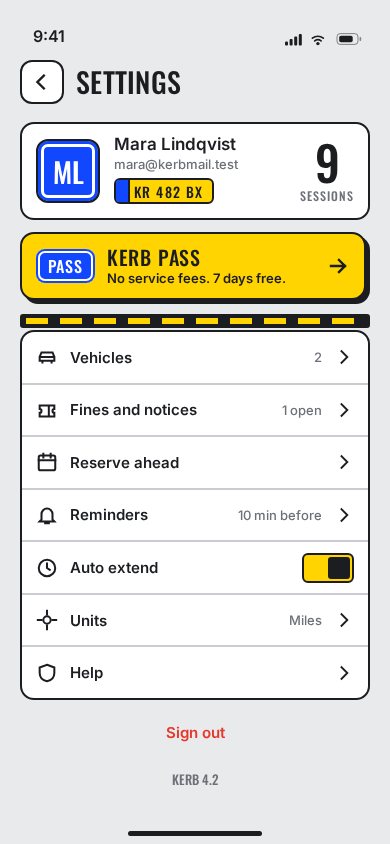
A settings screen from Kerb, a travel app template in a Brutalist style. Screen 25 of 25.
Kerb is kerb covers parking end to end: a drawn street map with live bays, street bay and garage details with rules by the hour, a duration dial, payment and a live countdown session you can extend. It also handles finding your car, history and receipts, resident permits, vehicles, wallet, fines, reserving ahead and a Kerb Pass plan.
| Detail | Value |
|---|---|
| Screen type | Settings |
| App | Kerb: Parking that reads like a road sign |
| Category | Travel |
| Design language | Brutalist, light |
| Type | Inter |
| Colours | #e9eaec background, #ffffff surface, #1b1d21 text, #6c7078 text-muted, #1147ff accent, #ffffff accent-contrast, #ffd400 secondary, #1b1d21 border, #e5372b danger |
What this screen says
- Settings
- ML
- Mara Lindqvistmara@kerbmail.testKR 482 BX
- Sessions
- Pass
- Kerb PassNo service fees. 7 days free.
- Vehicles2
- Fines and notices1 open
- Reserve ahead
- Reminders10 min before
- Auto extend
- UnitsMiles
- Help
- Sign out
- Kerb 4.2
Around it in Kerb
More settings screens
- Layover Settings: Airport guide, gates and lounges
- Permit Settings: Visas and travel documents wallet
- Backroad Settings: Road trip planner with stops
- Bunk Settings: Hostels and backpacker meetups
- Piazza Settings: Self-guided city walking tours
- Fjord Settings: Cruise companion on board
- Atlas Route options: Maps and navigation
- Linea Settings: City transit
- Hollow Settings: Cabin and boutique stays
- Aloft Settings: Flight tracker
- Pitch Settings: Campsite booking and trip kit
- Hail Settings: Ride hailing
Every travel app settings screen
What makes a good settings screen
- Group options into clear sections. Account, notifications, privacy, appearance and help, with headings, so people scan to the right group.
- Label settings by their effect. "Daily reminder at 8:00" is clearer than "Reminders". Add a short description under options that need one.
- Use the right control. Toggles for on and off, a row that opens a list for choices, and sliders only for ranges.
- Apply changes immediately. Most mobile settings take effect when changed, with no Save button to forget.
The full settings screen guide and every example
Remix Kerb free: describe your own app and it is drawn in this design. Or get its files from $10: Figma, React Native, SwiftUI, Flutter and HTML.