Templates · Home screens · Social app · Facet
Facet Calls screen
A home screen from Facet, a social app template in a Glass style. Screen 4 of 25.
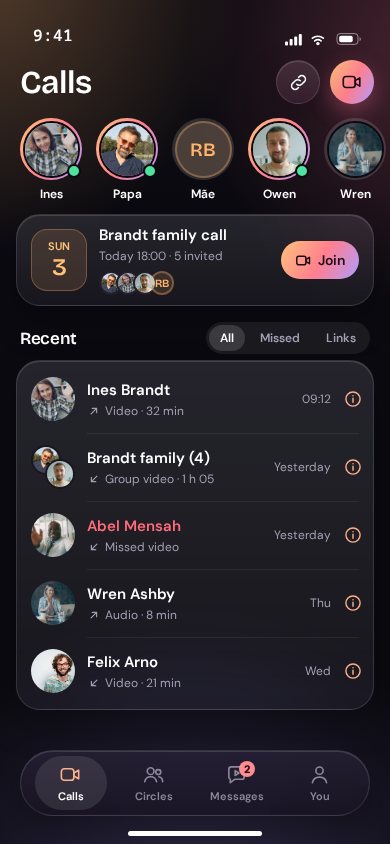
Facet is a complete video calling app for the people you love: welcome, phone sign in and a code, a calls home with favourites and an upcoming family call, new call, a contact with local time and shared history, ringing, an incoming call, a one to one call with live captions, a group call that spotlights the speaker, effects and backgrounds, share screen, watch together, circles, call links, video messages with recording and playback, a call summary, weekly call time, a Plus plan, your profile and settings. Plum black glass with an apricot to lilac prism.
| Detail | Value |
|---|---|
| Screen type | Home |
| App | Facet: Video calls with family and friends |
| Category | Social |
| Design language | Glass, dark |
| Type | Bricolage Grotesque for headings, DM Sans for text |
| Colours | #0b0a10 background, #1a1622 surface, #ffffff text, #a59fb4 text-muted, #ff7f8f accent, #1c0c16 accent-contrast, #ffc27a secondary, #2a2433 border, #4fe3a1 success, #ff3b4f danger |
What this screen says
- Calls
- Ines
- Papa
- RB
- Mãe
- Owen
- Wren
- SUN3
- Brandt family call
- Today 18:00 · 5 invited
- Join
- Recent
- All Missed Links
- Ines Brandt
- Video · 32 min
- Brandt family (4)
- Group video · 1 h 05
- Yesterday
- Abel Mensah
- Missed video
- Wren Ashby
- Audio · 8 min
- Thu
- Felix Arno
- Video · 21 min
- Wed
- Circles
- Messages 2
- You
Around it in Facet
More home screens
- Onair Home: Live streaming
- Drift Home: Reels and voice rooms
- Glitz Discover: Party live streaming
- Hearth Chats: Messenger for trips and circles
- Chirp Chats: Messenger with file sharing
- Banter Chats: Live messenger
- Natter Chats: Minimal messenger
- Nearly Home: Dating by crossed paths
- Linkup Home: Professional network and jobs
- Quorum Home: Questions and expert answers
- Backer Home: Support creators with memberships
- Pledge Discover: Back creative projects
What makes a good home screen
- Put the most important thing first. Decide the one thing most people come for, like today's workout, a balance or the next booking, and give it the top of the screen.
- Make it feel current. Greetings with the time of day, today's date, fresh numbers and recent activity tell people the app is alive and about them.
- Keep quick actions within thumb reach. The two or three things people do most should be one tap away, in the lower part of the screen or a floating button.
- Group related content in clear sections. Use headings and spacing so the screen scans as a few blocks, not a long mixed list.
The full home screen guide and every example
Remix Facet free: describe your own app and it is drawn in this design. Or get its files from $10: Figma, React Native, SwiftUI, Flutter and HTML.