Templates · Settings screens · Social app · Murmur
Murmur Settings screen
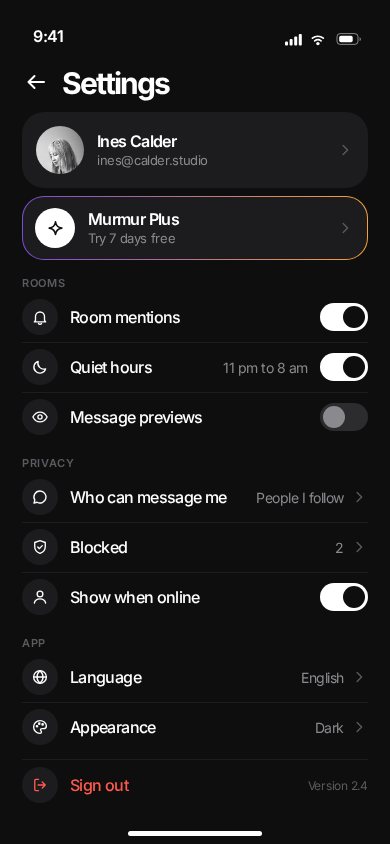
A settings screen from Murmur, a chat rooms for art lovers app template in a Dark-first style. Screen 25 of 25.
Murmur is a complete chat and communities app on near-black: onboarding, sign in, a code check and interest picking, a home with live room pills, people to follow and community tiles, an inbox, a group room over a full-bleed tinted image, direct chats, room info, a new room form, search, people, member profiles, communities, a photo viewer, notifications, insights, a Plus plan, profile, saved posts and settings. White round buttons do the work and one dusk gradient marks the follow button.
| Detail | Value |
|---|---|
| Screen type | Settings |
| App | Murmur: Chat rooms for art lovers |
| Category | Social |
| Design language | Dark-first, dark |
| Type | Inter |
| Colours | #0e0e0f background, #1c1c1e surface, #ffffff text, #8a8a8e text-muted, #ffffff accent, #0e0e0f accent-contrast, #f0452c secondary, #2c2c2e border, #ff5a4d danger |
What this screen says
- Settings
- Ines Calderines@calder.studio
- Murmur PlusTry 7 days free
- Rooms
- Room mentions
- Quiet hours
- 11 pm to 8 am
- Message previews
- Privacy
- Who can message me
- People I follow
- Blocked
- Show when online
- App
- Language
- English
- Appearance
- Dark
- Sign out
- Version 2.4
Around it in Murmur
More settings screens
- Blink Settings: Camera chat and stories
- Cipher Privacy: Encrypted private messenger
- Commons Settings: Friends, groups and events
- Tether Settings: Family location and safety
- Facet Settings: Video calls with family and friends
- Stoop Settings: Neighbourhood noticeboard
- Aura Settings: Moods with close friends
- Kindly Settings: Volunteering near you
- Cohort Settings: Alumni and mentor network
- Kin Settings: Private family circle
- Confetti Settings: Party invites and RSVPs
- Ripple Settings: Voice notes social
Every social app settings screen
What makes a good settings screen
- Group options into clear sections. Account, notifications, privacy, appearance and help, with headings, so people scan to the right group.
- Label settings by their effect. "Daily reminder at 8:00" is clearer than "Reminders". Add a short description under options that need one.
- Use the right control. Toggles for on and off, a row that opens a list for choices, and sliders only for ranges.
- Apply changes immediately. Most mobile settings take effect when changed, with no Save button to forget.
The full settings screen guide and every example
Remix Murmur free: describe your own app and it is drawn in this design. Or get its files from $10: Figma, React Native, SwiftUI, Flutter and HTML.