Templates · Player, camera and editor screens · Productivity app · Merge
Merge Changes screen
A media screen from Merge, a productivity app template in a Dark-first style. Screen 13 of 25.
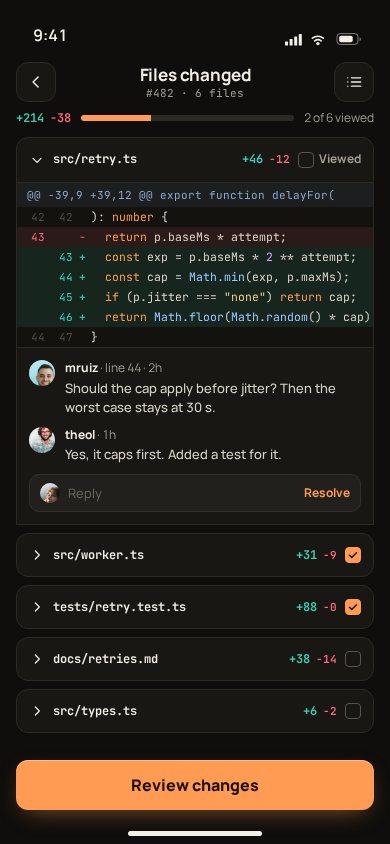
Merge is a complete code review app for your phone: welcome, sign in and two-step verification, a home with your work and reviews waiting, an inbox, search across repositories, pull requests and code, a repository with its files, a code viewer and commits, pull requests with a conversation timeline, a diff with inline comments, submitting a review, live checks with a streaming log, a merge confirmation and the merged state, issues with a detail and a new issue form, repository insights, a release, a Pro plan, profile and settings. Espresso black and charcoal with apricot, teal and rose.
| Detail | Value |
|---|---|
| Screen type | Media |
| App | Merge: Code, pull requests and reviews |
| Category | Productivity |
| Design language | Dark-first, dark |
| Type | JetBrains Mono for headings, Manrope for text |
| Colours | #0f0e0c background, #181714 surface, #f4efe6 text, #a39d92 text-muted, #ff9b52 accent, #1d1006 accent-contrast, #3fd0b4 secondary, #2c2a25 border, #ff6680 danger |
What this screen says
- Files changed
- #482 · 6 files
- +214−38
- 2 of 6 viewed
- src/retry.ts+46−12 Viewed
- @@ -39,9 +39,12 @@ export function delayFor(
- 4242 ): number {
- 43− return p.baseMs * attempt;
- 43+ const exp = p.baseMs * 2 ** attempt;
- 44+ const cap = Math.min (exp, p.maxMs);
- 45+ if (p.jitter === "none" ) return cap;
- 46+ return Math.floor (Math.random () * cap);
- 4447 }
- mruiz · line 44 · 2h
- Should the cap apply before jitter? Then the worst case stays at 30 s.
- theol · 1h
- Yes, it caps first. Added a test for it.
- ReplyResolve
- src/worker.ts+31−9
- tests/retry.test.ts+88−0
- docs/retries.md+38−14
- src/types.ts+6−2
- Review changes
Around it in Merge
More player, camera and editor screens
- Tapline Appearance: Link-in-bio pages and analytics
- Quill Meeting notes: Docs, wikis and databases in one workspace
- Tandem Huddle: Team chat, channels and huddles
- Shipyard Attachment: Issue tracking for product teams
- Canvas Prototype: Design files and comments on mobile
- Query Images: AI answers with sources
- Glossa Voice: Translate text, voice and camera
- Layout Editor: Design anything from templates
- Beacon Play sound: Find your devices and people
- Staffroom Scan receipt: HR, payslips and time off
- Ping Video test: Internet speed test
- Glance Camera: Visual search with the camera
Every productivity app media screen
What makes a good media player screen
- Content takes the space. Artwork, video or the camera view should fill most of the screen.
- Primary controls in the thumb zone. Play and pause, the shutter or the main tool, large and low on the screen.
- Show progress and position. A scrubber with elapsed and remaining time, or the step in a lesson.
- Hide secondary controls until needed. Lyrics, queue, filters and advanced tools can live behind a tap or a swipe.
The full media player screen guide and every example
Remix Merge free: describe your own app and it is drawn in this design. Or get its files from $10: Figma, React Native, SwiftUI, Flutter and HTML.