Templates · Player, camera and editor screens · Productivity app · Quill
Quill Meeting notes screen
A media screen from Quill, a productivity app template in a Minimal style. Screen 16 of 25.
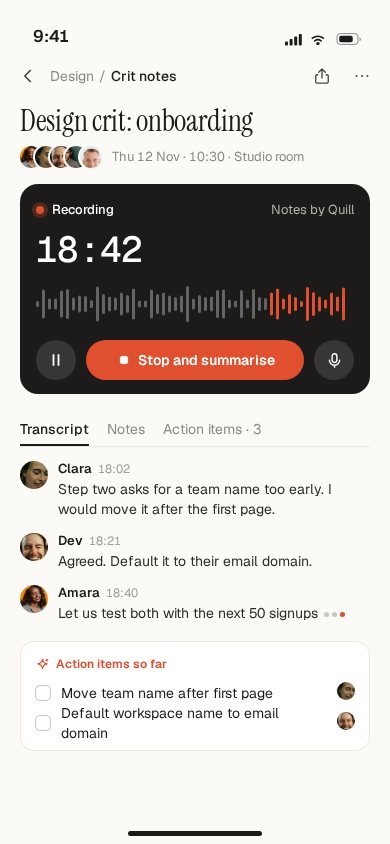
Quill is a complete everyday workspace: welcome and sign in with a code, a home with recent pages, events and my tasks, the page tree, a doc with cover, properties, to-dos, a callout and toggles, the slash menu over the keyboard, a verified team wiki, a database as a table, a board and a calendar, a task with properties and comments, a new task form, filters and sorts, search, templates, live meeting notes with a transcript, an assistant that answers from your pages, sharing, the inbox, workspace analytics, plans, checkout and a confirmation, account and settings. Paper white and ink with a vermilion accent.
| Detail | Value |
|---|---|
| Screen type | Media |
| App | Quill: Docs, wikis and databases in one workspace |
| Category | Productivity |
| Design language | Minimal, light |
| Type | Instrument Serif for headings, Geist for text |
| Colours | #fbfaf7 background, #ffffff surface, #1c1b19 text, #8c8982 text-muted, #e04f2e accent, #ffffff accent-contrast, #f3f1ec secondary, #ebe8e1 border, #b83a1d danger |
What this screen says
- Design/ Crit notes
- Design crit: onboarding
- Thu 12 Nov · 10:30 · Studio room
- Recording Notes by Quill
- Stop and summarise
- Transcript Notes Action items · 3
- Clara18:02
- Step two asks for a team name too early. I would move it after the first page.
- Dev18:21
- Agreed. Default it to their email domain.
- Amara18:40
- Let us test both with the next 50 signups
- Action items so far
- Move team name after first page
- Default workspace name to email domain
Around it in Quill
More player, camera and editor screens
- Dispatch Photos: Field service jobs for technicians
- Stash Listen: Read-it-later and highlights
- Branch Canvas: Mind maps
- Stow Photo preview: Cloud storage
- Meridian Reader: Mobile web browser
- Swarm Media: Torrent client
- Convene Preview: Video meetings
- Pomo Sound mix: Focus timer
- Scanly Scan: Document scanner
- Inkwell Add photos: Daily journal
- Shortlist Practice question: Job search and application tracker
- Parley Status: Team messenger
Every productivity app media screen
What makes a good media player screen
- Content takes the space. Artwork, video or the camera view should fill most of the screen.
- Primary controls in the thumb zone. Play and pause, the shutter or the main tool, large and low on the screen.
- Show progress and position. A scrubber with elapsed and remaining time, or the step in a lesson.
- Hide secondary controls until needed. Lyrics, queue, filters and advanced tools can live behind a tap or a swipe.
The full media player screen guide and every example
Remix Quill free: describe your own app and it is drawn in this design. Or get its files from $10: Figma, React Native, SwiftUI, Flutter and HTML.