Templates · Form and input screens · Productivity app · Merge
Merge Review screen
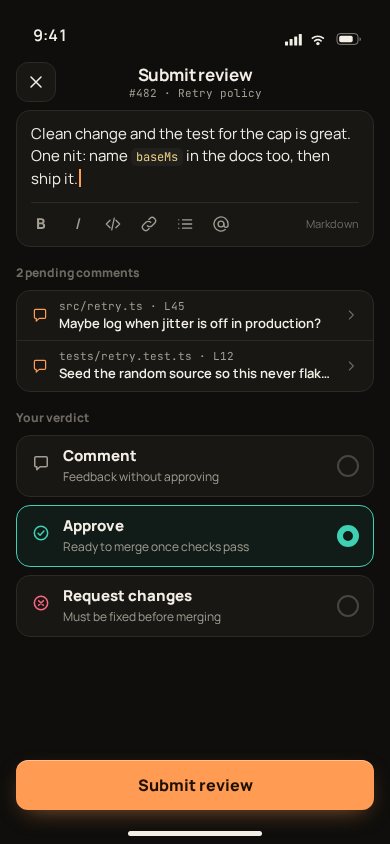
A form screen from Merge, a productivity app template in a Dark-first style. Screen 14 of 25.
Merge is a complete code review app for your phone: welcome, sign in and two-step verification, a home with your work and reviews waiting, an inbox, search across repositories, pull requests and code, a repository with its files, a code viewer and commits, pull requests with a conversation timeline, a diff with inline comments, submitting a review, live checks with a streaming log, a merge confirmation and the merged state, issues with a detail and a new issue form, repository insights, a release, a Pro plan, profile and settings. Espresso black and charcoal with apricot, teal and rose.
| Detail | Value |
|---|---|
| Screen type | Form |
| App | Merge: Code, pull requests and reviews |
| Category | Productivity |
| Design language | Dark-first, dark |
| Type | JetBrains Mono for headings, Manrope for text |
| Colours | #0f0e0c background, #181714 surface, #f4efe6 text, #a39d92 text-muted, #ff9b52 accent, #1d1006 accent-contrast, #3fd0b4 secondary, #2c2a25 border, #ff6680 danger |
What this screen says
- Submit review
- #482 · Retry policy
- Clean change and the test for the cap is great. One nit: name baseMs in the docs too, then ship it.
- BI Markdown
- 2 pending comments
- src/retry.ts · L45
- Maybe log when jitter is off in production?
- tests/retry.test.ts · L12
- Seed the random source so this never flakes
- Your verdict
- CommentFeedback without approving
- ApproveReady to merge once checks pass
- Request changesMust be fixed before merging
Around it in Merge
More form and input screens
- Deskly Book a desk: Hybrid office booking
- Pomo New session: Focus timer
- Postbox Compose: Email for busy teams
- Daybook New event: Calendar and planner
- Scanly Sign: Document scanner
- Keyring New item: Password manager
- Rota Swap shift: Shift scheduling for hourly teams
- Inkwell Write: Daily journal
- Shortlist Filters: Job search and application tracker
- Parley Create group: Team messenger
- Docket New task: Task and sprint planner
- Kanso New task: Tasks, calendar and chat
Every productivity app form screen
What makes a good form screen
- Ask only what you need. Every field is a reason to stop. Remove optional fields or move them to later.
- Labels above fields. Visible labels stay readable while people type; placeholder-only labels disappear.
- Use the right keyboard and input. Number pads for amounts, email keyboards for email, pickers for dates and autofill for addresses and codes.
- Validate as people go. Show problems next to the field when people leave it, in words that say how to fix them.
The full form screen guide and every example
Remix Merge free: describe your own app and it is drawn in this design. Or get its files from $10: Figma, React Native, SwiftUI, Flutter and HTML.