Templates · Player, camera and editor screens · Productivity app · Shipyard
Shipyard Attachment screen
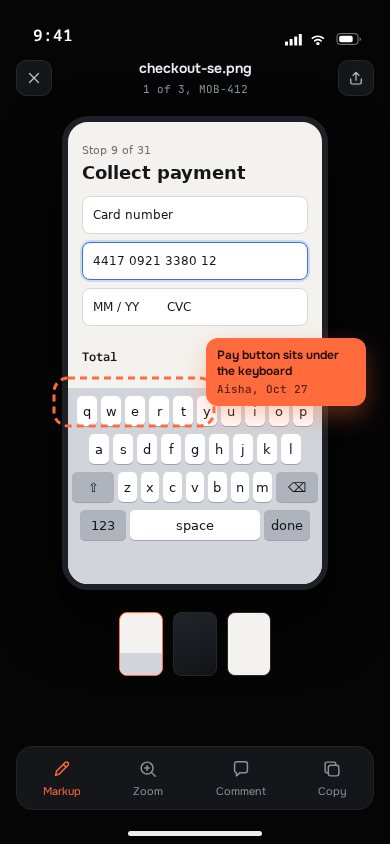
A media screen from Shipyard, an issue tracking for product teams app template in a Dark-first style. Screen 21 of 25.
Shipyard is a complete issue tracker for product teams: welcome, sign in and joining a workspace, a home with your issues and the running cycle, an inbox, team issues as a grouped list and a board, an issue with properties, sub-issues and a comment thread, a quick new issue sheet with a status picker, search and filters, a cycle burn-up with a closing summary, projects, a project page, a roadmap timeline, insights, a triage queue, a screenshot attachment viewer, plans with a seat checkout, a teammate profile and settings. Graphite and charcoal with buoy orange and seafoam.
| Detail | Value |
|---|---|
| Screen type | Media |
| App | Shipyard: Issue tracking for product teams |
| Category | Productivity |
| Design language | Dark-first, dark |
| Type | JetBrains Mono for headings, Onest for text |
| Colours | #0b0c0e background, #141619 surface, #eceef0 text, #8b929b text-muted, #ff6b3d accent, #1a0a03 accent-contrast, #3ad6b0 secondary, #24282d border, #ff5f6d danger |
What this screen says
- checkout-se.png
- 1 of 3, MOB-412
- Stop 9 of 31 Collect payment
- Card number
- MM / YY CVC
- Total €46.20
- Pay €46.20
- qwertyuiop
- asdfghjkl
- ⇧zxcvbnm⌫
- 123spacedone
- Pay button sits under the keyboardAisha, Oct 27
- Markup
- Zoom
- Comment
- Copy
Around it in Shipyard
More player, camera and editor screens
- Scanly Scan: Document scanner
- Inkwell Add photos: Daily journal
- Shortlist Practice question: Job search and application tracker
- Parley Status: Team messenger
- Docket Call: Task and sprint planner
- Margin Voice note: AI note taking
- Aide Ask Aide: Executive AI assistant
- Juno Voice: AI chat assistant
- Jot Sketch: Quick notes and checklists
- Chrono Focus: World clock, timers and stopwatch
- Frontdesk Call: Customer support inbox
- Campaign Email builder: Email marketing campaigns
Every productivity app media screen
What makes a good media player screen
- Content takes the space. Artwork, video or the camera view should fill most of the screen.
- Primary controls in the thumb zone. Play and pause, the shutter or the main tool, large and low on the screen.
- Show progress and position. A scrubber with elapsed and remaining time, or the step in a lesson.
- Hide secondary controls until needed. Lyrics, queue, filters and advanced tools can live behind a tap or a swipe.
The full media player screen guide and every example
Remix Shipyard free: describe your own app and it is drawn in this design. Or get its files from $10: Figma, React Native, SwiftUI, Flutter and HTML.