Templates · Detail screens · Fitness app · Medly
Medly Result screen
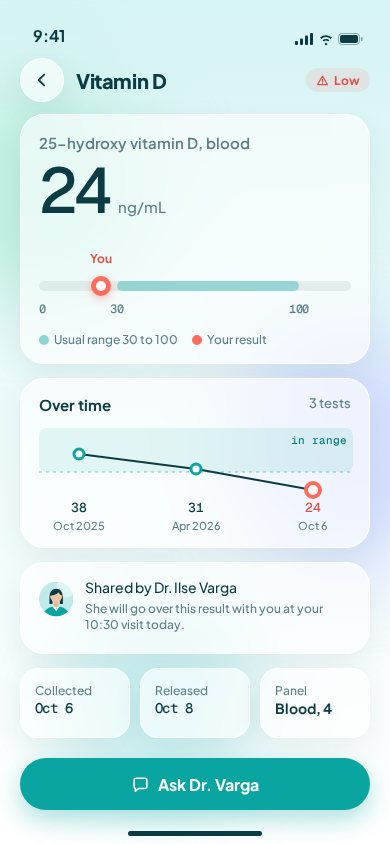
A detail screen from Medly, a doctor on call app template in a Glass style. Screen 21 of 25.
Medly is a complete telehealth app: welcome, sign in, a health profile, a home with the next video visit and today's doses, describing symptoms and suggested care, finding a doctor, picking a time, confirming and booking, a waiting room and the video visit itself, a visit summary, prescriptions with a dosage timeline and refills, test results with range bars, vitals, messages, notifications and profile. Every portrait and scene is drawn, and doctors, clinics and medicines are invented.
| Detail | Value |
|---|---|
| Screen type | Detail |
| App | Medly: Doctor on call |
| Category | Health and fitness |
| Design language | Glass, light |
| Type | Plus Jakarta Sans |
| Colours | #d6f3f5 background, #ffffff surface, #0b3b43 text, #5b7f86 text-muted, #0aa5a0 accent, #ffffff accent-contrast, #c9d4ff secondary, #e3f1f2 border, #ff6b5e danger |
What this screen says
- Vitamin D
- Low
- 25-hydroxy vitamin D, blood
- 24ng/mL
- You0 30 100
- Usual range 30 to 100 Your result
- Over time3 tests
- Shared by Dr. Ilse VargaShe will go over this result with you at your 10:30 visit today.
- CollectedOct 6
- ReleasedOct 8
- PanelBlood, 4
- Ask Dr. Varga
Around it in Medly
More detail screens
- Fasten Stages: Intermittent fasting
- Plate Food: Calorie and macro tracker
- Vita Test result: Personal health record
- Forge Workout: AI fitness and nutrition
- Lull Course: Sleep sounds and meditation
- Pace Workout: Fitness tracker
- Flexpass Studio: One membership, many studios
- Clinic Doctor: Find and book doctors
- Careline Task: Care for an ageing parent
- Velo Class: Live and on-demand indoor cycling
- Vantage Sleep: Sports watch companion
- Labwork Panel: Book blood tests and see results
Every fitness app detail screen
What makes a good detail screen
- Lead with what identifies the item. A large image or title, the price or status, and the key facts at the top. People should know they are in the right place at a glance.
- Keep the main action visible. A sticky bottom button for Add to cart, Book or Play stays reachable while people scroll through details.
- Order information by importance. The facts that decide the choice come first; reviews, specifications and fine print further down.
- Use progressive disclosure. Long descriptions, specifications and policies can expand on tap rather than filling the screen.
The full detail screen guide and every example
Remix Medly free: describe your own app and it is drawn in this design. Or get its files from $10: Figma, React Native, SwiftUI, Flutter and HTML.