Templates · Detail screens · Fitness app · Flexpass
Flexpass Studio screen
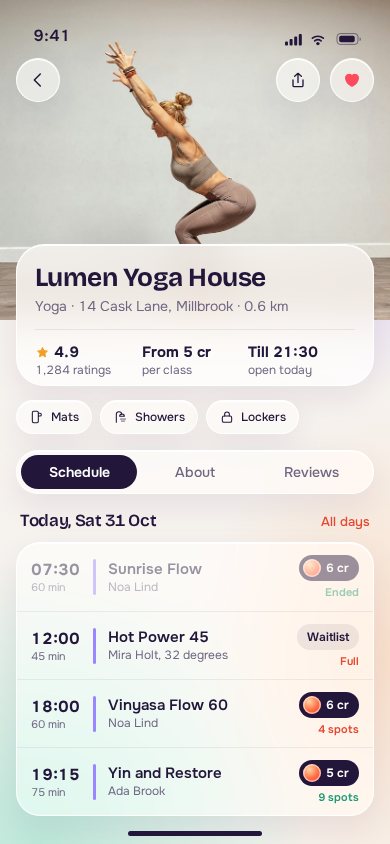
A detail screen from Flexpass, a health and fitness app template in a Glass style. Screen 8 of 25.
Flexpass is a complete multi studio membership: welcome, sign in and picking your mix, a home with the credit ring and your next class, search by time and type with filters, a studio map, studio and class pages, booking with a spot picker and confirmation, your schedule, a live check in pass, rating a class, wellness and spa bookings, on demand video, activity stats, a credit ledger, plans, saved studios, an instructor page, notifications, profile and settings. Cream glass with aubergine ink, a tangerine to coral gradient and a coin motif.
| Detail | Value |
|---|---|
| Screen type | Detail |
| App | Flexpass: One membership, many studios |
| Category | Health and fitness |
| Design language | Glass, light |
| Type | Bricolage Grotesque for headings, Onest for text |
| Colours | #f6f2ee background, #ffffff surface, #22163a text, #6f6782 text-muted, #ff5a36 accent, #ffffff accent-contrast, #7b63ff secondary, #ece6ee border, #e8344f danger |
What this screen says
- Lumen Yoga House
- Yoga · 14 Cask Lane, Millbrook · 0.6 km
- 4.91,284 ratings
- From 5 crper class
- Till 21:30open today
- Mats Showers Lockers
- Schedule About Reviews
- Today, Sat 31 Oct
- All days
- 60 min
- Sunrise Flow
- Noa Lind
- 6 cr Ended
- 45 min
- Hot Power 45
- Mira Holt, 32 degrees
- Waitlist Full
- Vinyasa Flow 60
- 6 cr 4 spots
- 75 min
- Yin and Restore
- Ada Brook
- 5 cr 9 spots
Around it in Flexpass
More detail screens
- Segment Activity: Runs and rides with friends
- Nightly Readiness: Smart ring sleep and readiness
- Pillbox Dose: Pharmacy refills and medicine reminders
- Rise Night: Alarm clock and sleep cycles
- Ward Visit: Patient portal for results, visits and messages
- Level Reading: Glucose monitor companion
- Reformer Class: Pilates studio booking
- Sip Drink: Water intake and hydration
- Mend Session: Physio and rehab exercises
- Tabata Workout: HIIT interval timer
- Jab Workout: Boxing workouts with a smart bag
- Exhale Box breathing: Breathwork sessions
Every fitness app detail screen
What makes a good detail screen
- Lead with what identifies the item. A large image or title, the price or status, and the key facts at the top. People should know they are in the right place at a glance.
- Keep the main action visible. A sticky bottom button for Add to cart, Book or Play stays reachable while people scroll through details.
- Order information by importance. The facts that decide the choice come first; reviews, specifications and fine print further down.
- Use progressive disclosure. Long descriptions, specifications and policies can expand on tap rather than filling the screen.
The full detail screen guide and every example
Remix Flexpass free: describe your own app and it is drawn in this design. Or get its files from $10: Figma, React Native, SwiftUI, Flutter and HTML.