Templates · Detail screens · Fitness app · Velo
Velo Class screen
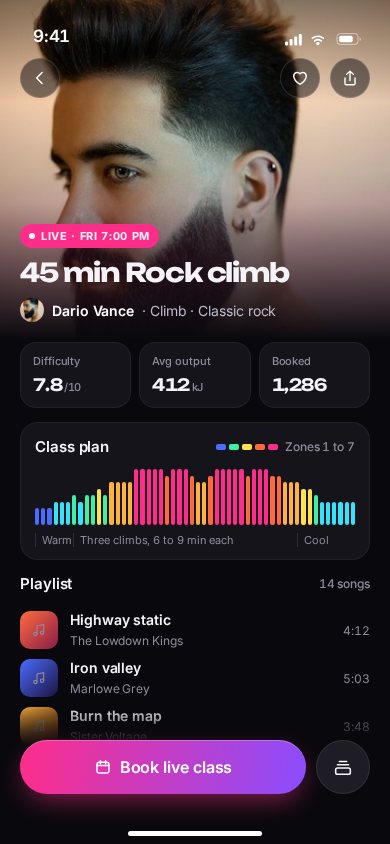
A detail screen from Velo, a live and on-demand indoor cycling app template in a Dark-first style. Screen 7 of 25.
Velo is a complete indoor cycling app: welcome, goals and sign in, a home with your streak, the next live ride and your stack, a class library with filters, class details with the playlist and effort profile, the live schedule, booking and a confirmation, a countdown, the ride itself with three live metrics and a leaderboard, a summary with an output graph, instructors, programs, a stack, progress, achievements, membership, notifications, profile and settings. Stage black with hot magenta, cyan and amber.
| Detail | Value |
|---|---|
| Screen type | Detail |
| App | Velo: Live and on-demand indoor cycling |
| Category | Health and fitness |
| Design language | Dark-first, dark |
| Type | Unbounded for headings, Inter for text |
| Colours | #09090d background, #15141b surface, #f5f3f8 text, #8e8b9b text-muted, #ff2d8a accent, #ffffff accent-contrast, #36e3ff secondary, #26242f border, #ffb23e warning |
What this screen says
- LIVE · FRI 7:00 PM
- 45 min Rock climb
- Dario Vance· Climb · Classic rock
- Difficulty
- Avg output
- 412kJ
- Booked
- Class plan
- Zones 1 to 7
- Warm Three climbs, 6 to 9 min each Cool
- Playlist14 songs
- Highway static
- The Lowdown Kings
- Iron valley
- Marlowe Grey
- Burn the map
- Sister Voltage
- Book live class
Around it in Velo
More detail screens
- Morsel Result: AI calorie tracker
- Dew Concern: AI skin scan and routine
- Cradle Sleep: Baby tracker
- Medly Suggested care: Doctor on call
- Donor Centre: Blood donation, counted drop by drop
- Unfold Class: Yoga and stretching
- Kilo Lift: Strength training log
- Cyra Day detail: Cycle tracker
- Harbor Entry: Therapy and mood
- Fasten Stages: Intermittent fasting
- Plate Food: Calorie and macro tracker
- Vita Test result: Personal health record
Every fitness app detail screen
What makes a good detail screen
- Lead with what identifies the item. A large image or title, the price or status, and the key facts at the top. People should know they are in the right place at a glance.
- Keep the main action visible. A sticky bottom button for Add to cart, Book or Play stays reachable while people scroll through details.
- Order information by importance. The facts that decide the choice come first; reviews, specifications and fine print further down.
- Use progressive disclosure. Long descriptions, specifications and policies can expand on tap rather than filling the screen.
The full detail screen guide and every example
Remix Velo free: describe your own app and it is drawn in this design. Or get its files from $10: Figma, React Native, SwiftUI, Flutter and HTML.