Templates · Detail screens · Fitness app · Forge
Forge Workout screen
A detail screen from Forge, an AI fitness and nutrition app template in a Dark-first style. Screen 8 of 25.
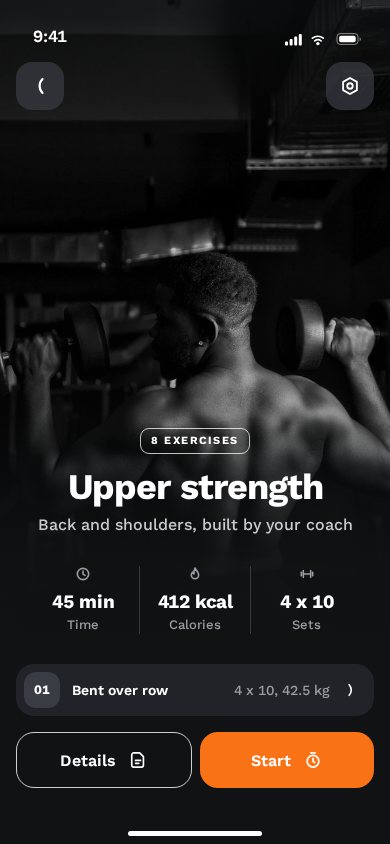
Forge is a complete AI fitness and nutrition app: onboarding, sign in, goal setup, a home with fitness metrics and today's workout, a fitness score, the workout library, workout and exercise details, a live workout, a tracked run on a map, heart rate, a nutrition day with macros, meal logging, a food scan, calories, sleep, an AI coach chat with voice, progress and body stats, a Pro plan, profile and settings. Near black and charcoal with hot orange, cobalt blue and black and white photography.
| Detail | Value |
|---|---|
| Screen type | Detail |
| App | Forge: AI fitness and nutrition |
| Category | Health and fitness |
| Design language | Dark-first, dark |
| Type | Work Sans |
| Colours | #111214 background, #24262b surface, #ffffff text, #9a9da6 text-muted, #f97316 accent, #ffffff accent-contrast, #2563eb secondary, #393c43 border, #f43f5e danger |
What this screen says
- 8 EXERCISES
- Upper strength
- Back and shoulders, built by your coach
- 45 minTime
- 412 kcalCalories
- 4 x 10Sets
- Bent over row
- 4 x 10, 42.5 kg
- Details
- Start
Around it in Forge
More detail screens
- Flexpass Studio: One membership, many studios
- Clinic Doctor: Find and book doctors
- Careline Task: Care for an ageing parent
- Velo Class: Live and on-demand indoor cycling
- Vantage Sleep: Sports watch companion
- Labwork Panel: Book blood tests and see results
- Segment Activity: Runs and rides with friends
- Nightly Readiness: Smart ring sleep and readiness
- Pillbox Dose: Pharmacy refills and medicine reminders
- Rise Night: Alarm clock and sleep cycles
- Ward Visit: Patient portal for results, visits and messages
- Level Reading: Glucose monitor companion
Every fitness app detail screen
What makes a good detail screen
- Lead with what identifies the item. A large image or title, the price or status, and the key facts at the top. People should know they are in the right place at a glance.
- Keep the main action visible. A sticky bottom button for Add to cart, Book or Play stays reachable while people scroll through details.
- Order information by importance. The facts that decide the choice come first; reviews, specifications and fine print further down.
- Use progressive disclosure. Long descriptions, specifications and policies can expand on tap rather than filling the screen.
The full detail screen guide and every example
Remix Forge free: describe your own app and it is drawn in this design. Or get its files from $10: Figma, React Native, SwiftUI, Flutter and HTML.