Templates · Detail screens · Fitness app · Vantage
Vantage Sleep screen
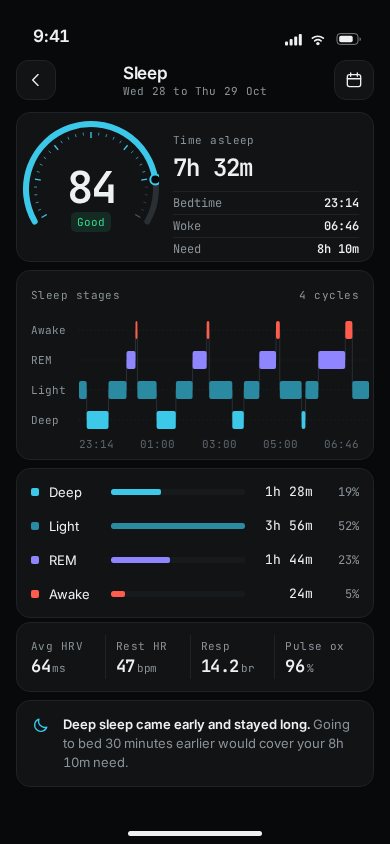
A detail screen from Vantage, a sports watch companion app template in a Clinical style. Screen 6 of 25.
Vantage is a complete sports watch companion: welcome, sign in and watch pairing, a customisable my day of cards, sleep score with stages, an energy reserve curve, heart rate, HRV status, training readiness and training load, activity history with a run on a map, splits and heart rate zones, suggested workouts with a structured interval plan scheduled and synced to the watch, device status, watch faces with complications, badges and challenges, notifications, a Pro plan, profile and settings. True black and charcoal with signal amber, cyan, mint and coral.
| Detail | Value |
|---|---|
| Screen type | Detail |
| App | Vantage: Sports watch companion |
| Category | Health and fitness |
| Design language | Clinical, dark |
| Type | JetBrains Mono for headings, Inter for text |
| Colours | #08090a background, #111315 surface, #eef1f2 text, #8a9399 text-muted, #ffb21a accent, #140d00 accent-contrast, #3cc8e8 secondary, #1f2327 border, #ff5c4d danger |
What this screen says
- Sleep
- Wed 28 to Thu 29 Oct
- 84Good
- Time asleep
- 7h 32m
- Bedtime 23:14
- Woke 06:46
- Need 8h 10m
- Sleep stages 4 cycles
- Awake REM Light Deep
- Deep 1h 28m 19%
- Light 3h 56m 52%
- REM 1h 44m 23%
- Awake 24m 5%
- Avg HRV 64ms
- Rest HR 47bpm
- Resp 14.2br
- Pulse ox 96%
- Deep sleep came early and stayed long. Going to bed 30 minutes earlier would cover your 8h 10m need.
Around it in Vantage
More detail screens
- Lull Course: Sleep sounds and meditation
- Pace Workout: Fitness tracker
- Flexpass Studio: One membership, many studios
- Clinic Doctor: Find and book doctors
- Careline Task: Care for an ageing parent
- Velo Class: Live and on-demand indoor cycling
- Labwork Panel: Book blood tests and see results
- Segment Activity: Runs and rides with friends
- Nightly Readiness: Smart ring sleep and readiness
- Pillbox Dose: Pharmacy refills and medicine reminders
- Rise Night: Alarm clock and sleep cycles
- Ward Visit: Patient portal for results, visits and messages
Every fitness app detail screen
What makes a good detail screen
- Lead with what identifies the item. A large image or title, the price or status, and the key facts at the top. People should know they are in the right place at a glance.
- Keep the main action visible. A sticky bottom button for Add to cart, Book or Play stays reachable while people scroll through details.
- Order information by importance. The facts that decide the choice come first; reviews, specifications and fine print further down.
- Use progressive disclosure. Long descriptions, specifications and policies can expand on tap rather than filling the screen.
The full detail screen guide and every example
Remix Vantage free: describe your own app and it is drawn in this design. Or get its files from $10: Figma, React Native, SwiftUI, Flutter and HTML.