Templates · Form and input screens · Music app · Masters
Masters New release screen
A form screen from Masters, a royalties and streams for artists app template in an Enterprise style. Screen 18 of 25.
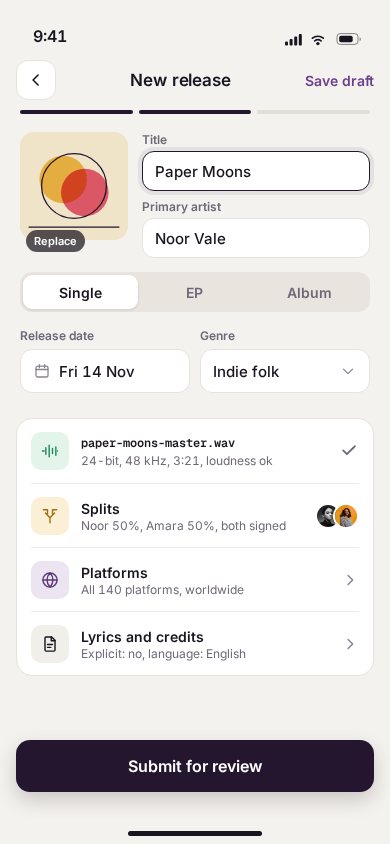
Masters is a complete royalties back office for an independent artist: welcome, sign in and connecting a distributor, a home with the month's earnings and a live launch, earnings and streams dashboards, a dot map of territories, the catalog, a release and a track, split sheets and a collaborator, statements with a gross to net waterfall, a withdraw flow with review and confirmation, a new release form and submission, a live release day tracker, search, notifications, a Pro plan, profile and settings. Warm paper and white with deep aubergine, gold and a coral for live.
| Detail | Value |
|---|---|
| Screen type | Form |
| App | Masters: Royalties and streams for artists |
| Category | Music |
| Design language | Enterprise, light |
| Type | Bricolage Grotesque for headings, Inter for text |
| Colours | #f4f2ee background, #ffffff surface, #19141f text, #6f6878 text-muted, #23162e accent, #ffffff accent-contrast, #e3ad3f secondary, #e7e3dc border, #d23c4f danger |
What this screen says
- New release
- Save draft
- Replace
- Title
- Paper Moons
- Primary artist
- Noor Vale
- Single EP Album
- Release date
- Fri 14 Nov
- Genre
- Indie folk
- paper-moons-master.wav24-bit, 48 kHz, 3:21, loudness ok
- SplitsNoor 50%, Amara 50%, both signed
- PlatformsAll 140 platforms, worldwide
- Lyrics and creditsExplicit: no, language: English
- Submit for review
Around it in Masters
More form and input screens
- Gigly Filters: Gig and festival tickets
- Padd New beat: Beat maker
- Aria Sleep timer: Audiobook library
- Hum Share: Song recognition
- Riff Upload: Upload and discover new tracks
- Groove Add record: Vinyl collection and crate digging
- Crossfade Save mix: DJ mixing on the go
- Fork Custom tuning: Tuner and metronome
- Belt Request: Karaoke nights
- Crowd Log a show: Concert diary and setlists
- Dial Request: Internet radio from everywhere
- Chorus Book a session: Singing lessons and pitch training
What makes a good form screen
- Ask only what you need. Every field is a reason to stop. Remove optional fields or move them to later.
- Labels above fields. Visible labels stay readable while people type; placeholder-only labels disappear.
- Use the right keyboard and input. Number pads for amounts, email keyboards for email, pickers for dates and autofill for addresses and codes.
- Validate as people go. Show problems next to the field when people leave it, in words that say how to fix them.
The full form screen guide and every example
Remix Masters free: describe your own app and it is drawn in this design. Or get its files from $10: Figma, React Native, SwiftUI, Flutter and HTML.