Templates · Onboarding screens · Smart home app · Lumen
Lumen Set up home screen
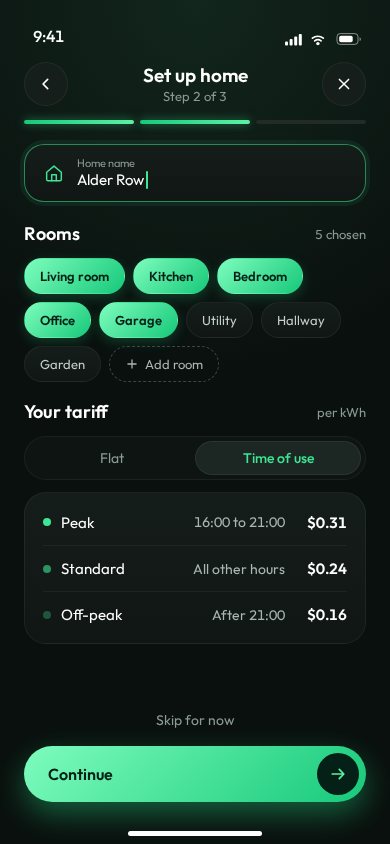
An onboarding screen from Lumen, a smart home energy app template in a Dark-first style. Screen 5 of 25.
Lumen is a complete smart home app built around energy: welcome, sign in, a code and home setup, a home with quick actions and device cards, rooms, a room with a thermostat dial, every device, light and speaker controls, pairing a device, scenes and schedules, live energy analytics, usage per device, solar and battery flow, savings, a monthly budget, the bill, a Plus plan, profile and settings. One mint green for everything that is on, saving or selected.
| Detail | Value |
|---|---|
| Screen type | Onboarding |
| App | Lumen: Smart home energy |
| Category | Smart home |
| Design language | Dark-first, dark |
| Type | Outfit |
| Colours | #0a100e background, #131a17 surface, #ffffff text, #8b9a93 text-muted, #3ee594 accent, #052016 accent-contrast, #12b76a secondary, #222b27 border, #ff6b6b danger |
What this screen says
- Set up home
- Step 2 of 3
- Home name
- Alder Row
- Rooms
- 5 chosen
- Living room Kitchen Bedroom Office Garage Utility Hallway Garden Add room
- Your tariff
- per kWh
- Flat Time of use
- Peak
- 16:00 to 21:00$0.31
- Standard
- All other hours$0.24
- Off-peak
- After 21:00$0.16
- Skip for now
- Continue
Around it in Lumen
More onboarding screens
- Lobby Welcome: Apartment building app
- Sweep Welcome: Robot vacuum and mop
- Dusk Welcome: Smart home scenarios
- Abode Welcome: Smart home devices
- Boxed Welcome: Book movers and plan moving day
- Meter Welcome: Your energy supplier account
- Couch Welcome: TV remote, casting and watchlist
- Chime Welcome: Voice assistant and smart speaker
- Latch Welcome: Smart locks and guest access
- Mesh Welcome: Home Wi-Fi network
- Decibel Welcome: Multi-room speakers
- Nursery Welcome: Baby monitor camera and sleep
Every smart home app onboarding screen
What makes a good onboarding screen
- One idea per screen. Each screen should say one thing in a headline people can read in a second. If a screen needs a paragraph, it is doing too much.
- Personalise with a purpose. Ask a question only if the answer changes what people see next, like a goal, a level or an interest. Then show that the answer mattered.
- Explain permissions before asking. Show your own screen saying why you need notifications, location or the camera before the system prompt. People who understand the reason are more likely to allow it.
- Let people skip. A visible skip or "I'll do this later" respects returning users and the impatient. Make sure skipping still lands them somewhere useful.
The full onboarding screen guide and every example
Remix Lumen free: describe your own app and it is drawn in this design. Or get its files from $10: Figma, React Native, SwiftUI, Flutter and HTML.