Templates · Player, camera and editor screens · Education app · Lexis
Lexis Flashcard screen
A media screen from Lexis, an education app template in a Luxury style. Screen 13 of 25.
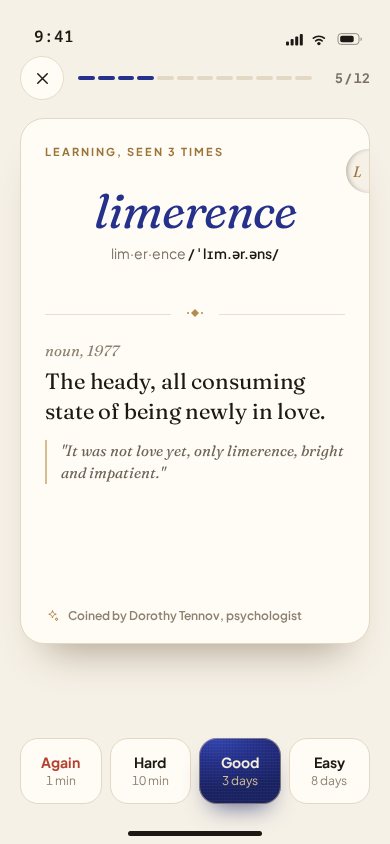
Lexis is a complete word a day app: welcome, interests and sign in, a Today screen with the word of the day as a lapis bookcloth card, the full dictionary entry, a pronunciation coach with your voice against the reference, an etymology lineage, quotations in the wild, a quiz with results, writing your own sentence, spaced review with flashcards, your lexicon with an A to Z thumb index, search, curated collections, adding a word you met, progress, a Patron plan, gifting a year, notifications, profile and settings. Vellum and ivory with lapis bookcloth and gilt.
| Detail | Value |
|---|---|
| Screen type | Media |
| App | Lexis: A word a day |
| Category | Education |
| Design language | Luxury, light |
| Type | Fraunces for headings, Plus Jakarta Sans for text |
| Colours | #f6f1e7 background, #fffcf6 surface, #1c1813 text, #7b7265 text-muted, #25318a accent, #f6efe0 accent-contrast, #b48a4e secondary, #e6dccb border, #b3412f danger |
What this screen says
- Learning, seen 3 times
- limerence
- lim·er·ence /ˈlɪm.ər.əns/
- noun, 1977
- The heady, all consuming state of being newly in love.
- "It was not love yet, only limerence, bright and impatient."
- Coined by Dorothy Tennov, psychologist
- Again1 min
- Hard10 min
- Good3 days
- Easy8 days
Around it in Lexis
More player, camera and editor screens
- Syntax Lesson: Learn to code
- Tuckin Reader: Bedtime stories for kids
- Zenith Sky map: Night sky guide
- Chalk Lesson: Design courses
- Encore Lesson: Creator courses
- Classroom Scan pages: Class stream and assignments
- Studyhall Video lesson: Free lessons and practice for school
- Tutor Lesson room: Book online tutors for any skill
- Leaf Reader: E-books and reading
- Almanac Picture of the day: The free encyclopedia reader
- Tiles Fiver: Daily word and number puzzles
- Stacks Reader: Borrow e-books and audiobooks from your library
Every education app media screen
What makes a good media player screen
- Content takes the space. Artwork, video or the camera view should fill most of the screen.
- Primary controls in the thumb zone. Play and pause, the shutter or the main tool, large and low on the screen.
- Show progress and position. A scrubber with elapsed and remaining time, or the step in a lesson.
- Hide secondary controls until needed. Lyrics, queue, filters and advanced tools can live behind a tap or a swipe.
The full media player screen guide and every example
Remix Lexis free: describe your own app and it is drawn in this design. Or get its files from $10: Figma, React Native, SwiftUI, Flutter and HTML.