Templates · List and feed screens · Education app · Lexis
Lexis Lexicon screen
A list screen from Lexis, an education app template in a Luxury style. Screen 14 of 25.
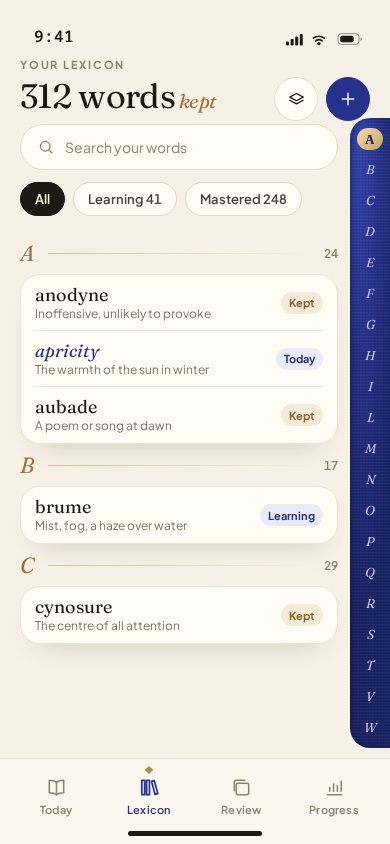
Lexis is a complete word a day app: welcome, interests and sign in, a Today screen with the word of the day as a lapis bookcloth card, the full dictionary entry, a pronunciation coach with your voice against the reference, an etymology lineage, quotations in the wild, a quiz with results, writing your own sentence, spaced review with flashcards, your lexicon with an A to Z thumb index, search, curated collections, adding a word you met, progress, a Patron plan, gifting a year, notifications, profile and settings. Vellum and ivory with lapis bookcloth and gilt.
| Detail | Value |
|---|---|
| Screen type | List |
| App | Lexis: A word a day |
| Category | Education |
| Design language | Luxury, light |
| Type | Fraunces for headings, Plus Jakarta Sans for text |
| Colours | #f6f1e7 background, #fffcf6 surface, #1c1813 text, #7b7265 text-muted, #25318a accent, #f6efe0 accent-contrast, #b48a4e secondary, #e6dccb border, #b3412f danger |
What this screen says
- Your lexicon
- 312 wordskept
- Search your words
- All Learning 41 Mastered 248
- A24
- anodyneInoffensive, unlikely to provoke
- Kept
- apricityThe warmth of the sun in winter
- Today
- aubadeA poem or song at dawn
- B17
- brumeMist, fog, a haze over water
- Learning
- C29
- cynosureThe centre of all attention
- A B C D E F G H I L M N O P Q R S T V W
- Lexicon
- Review
- Progress
Around it in Lexis
More list and feed screens
- Classroom Classwork: Class stream and assignments
- Studyhall Assigned: Free lessons and practice for school
- Tutor Reviews: Book online tutors for any skill
- Leaf Library: E-books and reading
- Almanac Contents: The free encyclopedia reader
- Tiles Archive: Daily word and number puzzles
- Stacks Loans: Borrow e-books and audiobooks from your library
- Penpal Chats: Language exchange chat
- Quanta Lab notebook: Interactive physics lessons
- Cram Subjects: Exam prep and mock tests
- Quad Week: University campus app
- Palm Course: Learn sign language
Every education app list screen
What makes a good list screen
- Show what people need to decide. Each row should carry just enough to choose: a title, one or two details and a status. Everything else belongs on the detail screen.
- Keep rows consistent. The same information in the same place on every row lets people scan down a column instead of reading each item.
- Group with headings. Dates, categories or status headings break long lists into chunks people can skip through.
- Make common actions quick. Swipe actions, a checkbox or a heart on the row save opening the item for small tasks.
The full list screen guide and every example
Remix Lexis free: describe your own app and it is drawn in this design. Or get its files from $10: Figma, React Native, SwiftUI, Flutter and HTML.