Templates · Player, camera and editor screens · Productivity app · Lectern
Lectern Presenter screen
A media screen from Lectern, a slides and presenter remote app template in a Dark-first style. Screen 17 of 25.
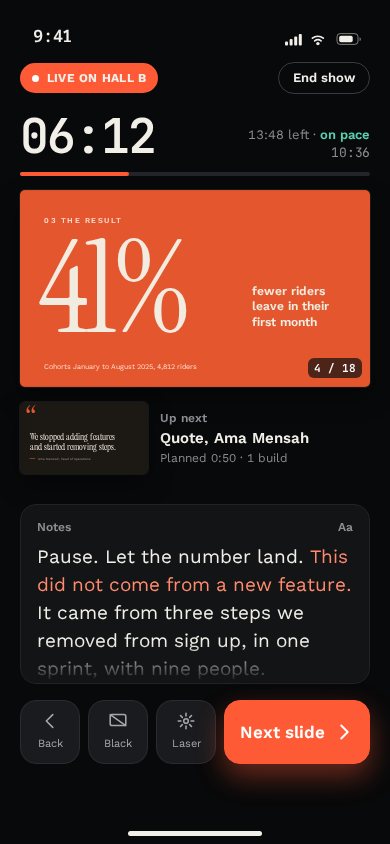
Lectern is a complete slides app: welcome, sign in, a deck gallery with the next talk, search across slides and notes, themes for a new deck, a deck page, the slide navigator, a slide editor with text format, layouts, chart data and builds, comments, rehearsal with a live timer and a report, connecting to a screen, presenter view with notes, the phone as a remote and laser, share, export and a ready file, a Pro plan, activity, profile and settings. Graphite backstage, cream paper slides and a laser vermilion.
| Detail | Value |
|---|---|
| Screen type | Media |
| App | Lectern: Slides and presenter remote |
| Category | Productivity |
| Design language | Dark-first, dark |
| Type | Instrument Serif for headings, Work Sans for text |
| Colours | #0d0e10 background, #16171a surface, #f2efe9 text, #8e8c93 text-muted, #ff5a36 accent, #ffffff accent-contrast, #f2ece0 secondary, #2a2b30 border, #ffc14d warning, #5ad1b0 success |
What this screen says
- LIVE ON HALL B End show
- 13:48 left · on pace
- Up next
- Quote, Ama Mensah
- Planned 0:50 · 1 build
- Notes Aa
- Pause. Let the number land. This did not come from a new feature. It came from three steps we removed from sign up,...
- Back
- Black
- Laser
- Next slide
Around it in Lectern
More player, camera and editor screens
- Query Images: AI answers with sources
- Glossa Voice: Translate text, voice and camera
- Layout Editor: Design anything from templates
- Beacon Play sound: Find your devices and people
- Staffroom Scan receipt: HR, payslips and time off
- Ping Video test: Internet speed test
- Glance Camera: Visual search with the camera
- Replay Recording: Record and share screen videos
- Easel Board: Collaborative whiteboard
- Token Scan code: Two-factor codes and sign-in approvals
- Beam Preview: Send big files
- Parchment Editing: Documents, edit and share
Every productivity app media screen
What makes a good media player screen
- Content takes the space. Artwork, video or the camera view should fill most of the screen.
- Primary controls in the thumb zone. Play and pause, the shutter or the main tool, large and low on the screen.
- Show progress and position. A scrubber with elapsed and remaining time, or the step in a lesson.
- Hide secondary controls until needed. Lyrics, queue, filters and advanced tools can live behind a tap or a swipe.
The full media player screen guide and every example
Remix Lectern free: describe your own app and it is drawn in this design. Or get its files from $10: Figma, React Native, SwiftUI, Flutter and HTML.