Templates · Player, camera and editor screens · Productivity app · Parchment
Parchment Editing screen
A media screen from Parchment, a productivity app template in a Minimal style. Screen 8 of 25.
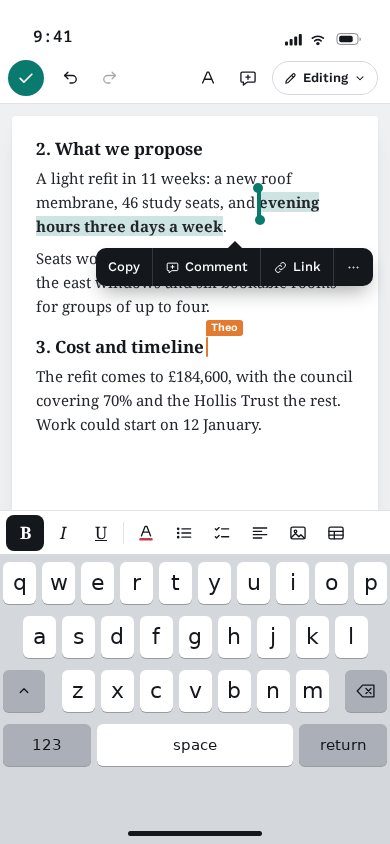
Parchment is a complete documents app: welcome, sign in, a home with new document starters and a grid of recent pages, search, files and shared with me, a document page, live editing with a formatting bar and keyboard, text style, suggestion mode with tracked changes, comments and a reply thread, the outline, share with roles, link access and an invite sent screen, version history and an old version to restore, templates, document activity, offline files, notifications, a Pro plan, profile and settings. Fog grey and paper white with ink, verdigris and a highlighter yellow.
| Detail | Value |
|---|---|
| Screen type | Media |
| App | Parchment: Documents, edit and share |
| Category | Productivity |
| Design language | Minimal, light |
| Type | Iowan Old Style for headings, Work Sans for text |
| Colours | #eef0f2 background, #ffffff surface, #14171c text, #687079 text-muted, #0b7a6e accent, #ffffff accent-contrast, #ffe27a secondary, #e0e3e7 border, #c23b4a danger |
What this screen says
- Editing
- 2. What we propose
- A light refit in 11 weeks: a new roof membrane, 46 study seats, and evening hours three days a week .
- Seats would be split between long desks by the east windows and six bookable rooms for groups of up to four.
- 3. Cost and timelineTheo
- The refit comes to £184,600, with the council covering 70% and the Hollis Trust the rest. Work could start on 12...
- Copy Comment Link
- B I U
- q w e r t y u i o p
- a s d f g h j k l
- z x c v b n m
- 123 space return
Around it in Parchment
More player, camera and editor screens
- Inkwell Add photos: Daily journal
- Shortlist Practice question: Job search and application tracker
- Parley Status: Team messenger
- Docket Call: Task and sprint planner
- Margin Voice note: AI note taking
- Aide Ask Aide: Executive AI assistant
- Juno Voice: AI chat assistant
- Jot Sketch: Quick notes and checklists
- Chrono Focus: World clock, timers and stopwatch
- Frontdesk Call: Customer support inbox
- Campaign Email builder: Email marketing campaigns
- Outpost Crop: Schedule social posts
Every productivity app media screen
What makes a good media player screen
- Content takes the space. Artwork, video or the camera view should fill most of the screen.
- Primary controls in the thumb zone. Play and pause, the shutter or the main tool, large and low on the screen.
- Show progress and position. A scrubber with elapsed and remaining time, or the step in a lesson.
- Hide secondary controls until needed. Lyrics, queue, filters and advanced tools can live behind a tap or a swipe.
The full media player screen guide and every example
Remix Parchment free: describe your own app and it is drawn in this design. Or get its files from $10: Figma, React Native, SwiftUI, Flutter and HTML.