Templates · Form and input screens · Productivity app · Lectern
Lectern Connect screen
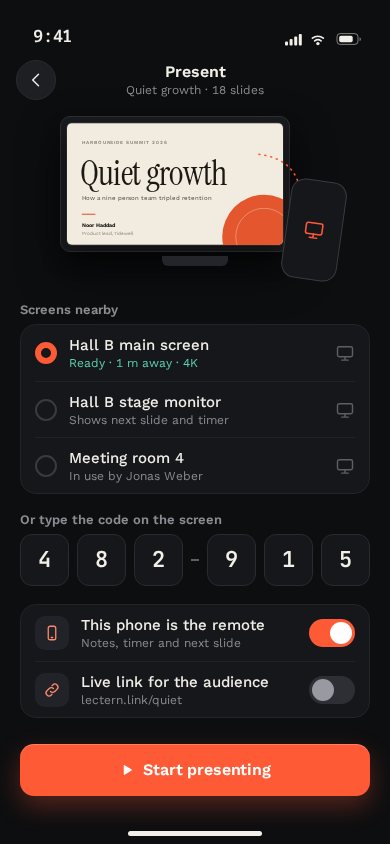
A form screen from Lectern, a slides and presenter remote app template in a Dark-first style. Screen 16 of 25.
Lectern is a complete slides app: welcome, sign in, a deck gallery with the next talk, search across slides and notes, themes for a new deck, a deck page, the slide navigator, a slide editor with text format, layouts, chart data and builds, comments, rehearsal with a live timer and a report, connecting to a screen, presenter view with notes, the phone as a remote and laser, share, export and a ready file, a Pro plan, activity, profile and settings. Graphite backstage, cream paper slides and a laser vermilion.
| Detail | Value |
|---|---|
| Screen type | Form |
| App | Lectern: Slides and presenter remote |
| Category | Productivity |
| Design language | Dark-first, dark |
| Type | Instrument Serif for headings, Work Sans for text |
| Colours | #0d0e10 background, #16171a surface, #f2efe9 text, #8e8c93 text-muted, #ff5a36 accent, #ffffff accent-contrast, #f2ece0 secondary, #2a2b30 border, #ffc14d warning, #5ad1b0 success |
What this screen says
- PresentQuiet growth · 18 slides
- Screens nearby
- Hall B main screen
- Ready · 1 m away · 4K
- Hall B stage monitor
- Shows next slide and timer
- Meeting room 4
- In use by Jonas Weber
- Or type the code on the screen
- This phone is the remote
- Notes, timer and next slide
- Live link for the audience
- lectern.link/quiet
- Start presenting
Around it in Lectern
More form and input screens
- Pageview Compare: Website analytics
- Polish Rewrite: Writing assistant and keyboard
- Tapline Add link: Link-in-bio pages and analytics
- Quill Insert block: Docs, wikis and databases in one workspace
- Tandem Compose: Team chat, channels and huddles
- Shipyard Comments: Issue tracking for product teams
- Canvas New comment: Design files and comments on mobile
- Merge Review: Code, pull requests and reviews
- Query Research: AI answers with sources
- Glossa New document: Translate text, voice and camera
- Layout Edit text: Design anything from templates
- Tick Quick add: To-do lists and reminders
Every productivity app form screen
What makes a good form screen
- Ask only what you need. Every field is a reason to stop. Remove optional fields or move them to later.
- Labels above fields. Visible labels stay readable while people type; placeholder-only labels disappear.
- Use the right keyboard and input. Number pads for amounts, email keyboards for email, pickers for dates and autofill for addresses and codes.
- Validate as people go. Show problems next to the field when people leave it, in words that say how to fix them.
The full form screen guide and every example
Remix Lectern free: describe your own app and it is drawn in this design. Or get its files from $10: Figma, React Native, SwiftUI, Flutter and HTML.