Templates · Player, camera and editor screens · Productivity app · Easel
Easel Board screen
A media screen from Easel, a collaborative whiteboard app template in a Playful style. Screen 8 of 25.
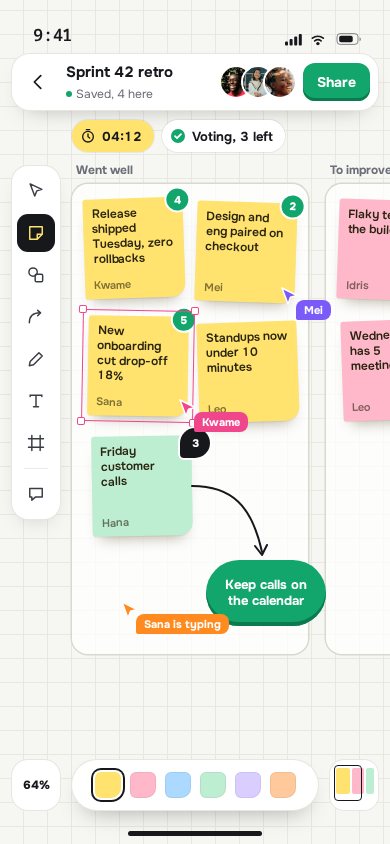
Easel is a complete team whiteboard: welcome, sign in and workspace setup, a boards home with a live board, search, templates and a retro template, the board itself with frames, stickies, connectors and live cursors, sticky editing, shapes and lines, frames, a journey map in follow mode, dot voting with results, a shared timer, comments and a thread, present mode, sharing with an invite sent screen, insights, activity, the Team plan, profile and settings. Warm grid paper with leaf green, lemon and ink.
| Detail | Value |
|---|---|
| Screen type | Media |
| App | Easel: Collaborative whiteboard |
| Category | Productivity |
| Design language | Playful, light |
| Type | Bricolage Grotesque for headings, Onest for text |
| Colours | #f6f6f2 background, #ffffff surface, #17181c text, #6c6e78 text-muted, #12a56c accent, #ffffff accent-contrast, #ffe36e secondary, #e7e6df border, #f04a4a danger |
What this screen says
- Sprint 42 retroSaved, 4 here
- Share
- Voting, 3 left
- Went well
- To improve
- Release shipped Tuesday, zero rollbacksKwame4
- Design and eng paired on checkoutMei2
- New onboarding cut drop-off 18%Sana5
- Standups now under 10 minutesLeo
- Friday customer callsHana
- Flaky tests on the buildIdris6
- Wednesday has 5 meetingsLeo
- Keep calls on
- the calendar
- Kwame
- Mei
- Sana is typing
Around it in Easel
More player, camera and editor screens
- Ping Video test: Internet speed test
- Glance Camera: Visual search with the camera
- Replay Recording: Record and share screen videos
- Token Scan code: Two-factor codes and sign-in approvals
- Beam Preview: Send big files
- Parchment Editing: Documents, edit and share
- Lectern Editor: Slides and presenter remote
- Ringer Incoming call: Phone, contacts and voicemail
- Pipeline Voice note: Sales CRM on the road
- Aim Weekly brief: Goals and key results
- Scribe Recording: Voice memos to notes
- Inkline Document: Sign and send contracts
Every productivity app media screen
What makes a good media player screen
- Content takes the space. Artwork, video or the camera view should fill most of the screen.
- Primary controls in the thumb zone. Play and pause, the shutter or the main tool, large and low on the screen.
- Show progress and position. A scrubber with elapsed and remaining time, or the step in a lesson.
- Hide secondary controls until needed. Lyrics, queue, filters and advanced tools can live behind a tap or a swipe.
The full media player screen guide and every example
Remix Easel free: describe your own app and it is drawn in this design. Or get its files from $10: Figma, React Native, SwiftUI, Flutter and HTML.