Templates · Form and input screens · Sports app · Lapse
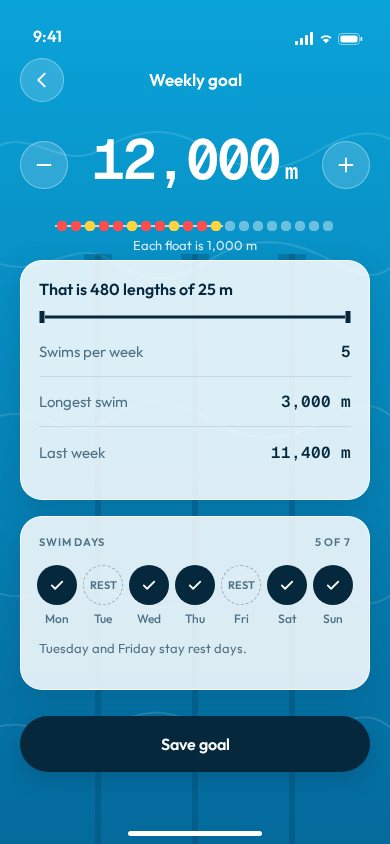
Lapse Weekly goal screen
A form screen from Lapse, a swim training app template in a Glass style. Screen 21 of 25.
Lapse is a complete swim training app seen from above the water: welcome, sign in, setting up your pool, a home with this morning's swim and the week's distance, logging a set, a session with lap splits and stroke rate, a pace clock, a pool finder with lane availability, technique drills, training plans, a swim log, personal bests, a weekly goal, a Plus plan, notifications, profile and settings. Everything is drawn: lane lines, ropes, a pace clock dial and stroke pictograms.
| Detail | Value |
|---|---|
| Screen type | Form |
| App | Lapse: Swim training |
| Category | Sports |
| Design language | Glass, light |
| Type | Outfit |
| Colours | #0aa3d9 background, #ffffff surface, #06283d text, #4d7186 text-muted, #ff4d4d accent, #ffffff accent-contrast, #ffd23f secondary, #046a9c border, #ff4d4d danger |
What this screen says
- Weekly goal
- 12,000m
- Each float is 1,000 m
- That is 480 lengths of 25 m
- Swims per week 5
- Longest swim 3,000 m
- Last week 11,400 m
- Swim days 5 of 7
- Mon
- RESTTue
- Wed
- Thu
- RESTFri
- Sat
- Sun
- Tuesday and Friday stay rest days.
- Save goal
Around it in Lapse
More form and input screens
- Swell Log session: Surf forecast
- Pitwall Simulation setup: Race engineering
- Elevens Create team: Fantasy cricket leagues
- Scoreboard Score alerts: Scores and news for every sport
- Bib Runner details: Find and enter races
- Wicket Predict: Live cricket scores
- Courtside Start a run: Pickup basketball games
- Tack Enter regatta: Sailing wind and regatta tracker
- Frag Register team: Esports tournaments and teams
- Canter Log a ride: Riding stables and lessons
- Ollie Add a spot: Skate spots and clips
- Eddy New alert: River levels for paddlers
What makes a good form screen
- Ask only what you need. Every field is a reason to stop. Remove optional fields or move them to later.
- Labels above fields. Visible labels stay readable while people type; placeholder-only labels disappear.
- Use the right keyboard and input. Number pads for amounts, email keyboards for email, pickers for dates and autofill for addresses and codes.
- Validate as people go. Show problems next to the field when people leave it, in words that say how to fix them.
The full form screen guide and every example
Remix Lapse free: describe your own app and it is drawn in this design. Or get its files from $10: Figma, React Native, SwiftUI, Flutter and HTML.