Templates · Form and input screens · Sports app · Courtside
Courtside Start a run screen
A form screen from Courtside, a pickup basketball games app template in a Gen Z style. Screen 11 of 25.
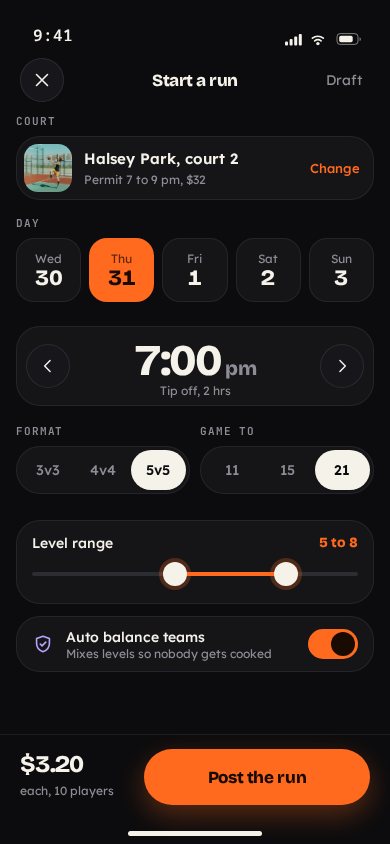
Courtside is a complete pickup basketball app: welcome, your game, sign in and a code, a home with the next run and open spots nearby, a courts map, court and run pages, joining a run with a split court fee and a locked in pass, starting your own run, my runs, the run chat, a live scoreboard to 21, a box score, rating the run, season stats, a city leaderboard, highlights, your crew, player cards, notifications, Courtside Pro, profile and settings. Asphalt black, chalk white, ball orange and lilac.
| Detail | Value |
|---|---|
| Screen type | Form |
| App | Courtside: Pickup basketball games |
| Category | Sports |
| Design language | Gen Z, dark |
| Type | Bricolage Grotesque for headings, Lexend for text |
| Colours | #0c0c0e background, #151518 surface, #f5f2ea text, #8e8c96 text-muted, #ff6a1f accent, #1a0b02 accent-contrast, #b8a4ff secondary, #24242a border, #ff4766 danger |
What this screen says
- Start a run
- Draft
- Court
- Halsey Park, court 2Permit 7 to 9 pm, $32
- Change
- Day
- Wed30
- Thu31
- Fri1
- Sat2
- Sun3
- 7:00pmTip off, 2 hrs
- Format
- 3v3 4v4 5v5
- Game to
- Level range5 to 8
- Auto balance teamsMixes levels so nobody gets cooked
- $3.20each, 10 players
- Post the run
Around it in Courtside
More form and input screens
- Scoreboard Score alerts: Scores and news for every sport
- Bib Runner details: Find and enter races
- Wicket Predict: Live cricket scores
- Tack Enter regatta: Sailing wind and regatta tracker
- Frag Register team: Esports tournaments and teams
- Canter Log a ride: Riding stables and lessons
- Ollie Add a spot: Skate spots and clips
- Eddy New alert: River levels for paddlers
- Whistle Team sheet: Grassroots league manager for coaches
- Oche New game: Darts scorer and leagues
- Cairn Download region: Trails, contours and summits on one map sheet
- Lapse Log a set: Swim training
What makes a good form screen
- Ask only what you need. Every field is a reason to stop. Remove optional fields or move them to later.
- Labels above fields. Visible labels stay readable while people type; placeholder-only labels disappear.
- Use the right keyboard and input. Number pads for amounts, email keyboards for email, pickers for dates and autofill for addresses and codes.
- Validate as people go. Show problems next to the field when people leave it, in words that say how to fix them.
The full form screen guide and every example
Remix Courtside free: describe your own app and it is drawn in this design. Or get its files from $10: Figma, React Native, SwiftUI, Flutter and HTML.