Templates · Form and input screens · Sports app · Ollie
Ollie Add a spot screen
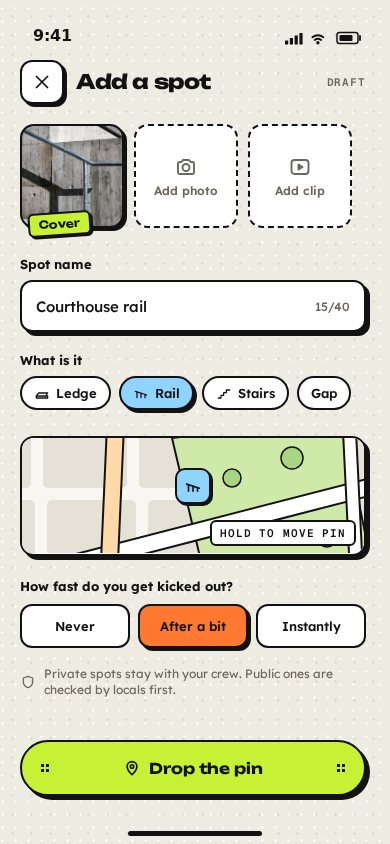
A form screen from Ollie, a skate spots and clips app template in a Neubrutalism style. Screen 8 of 25.
Ollie is a complete skate app: welcome and stance setup, sign in, a home with skate weather and nearby spots, a sticker pin spot map, search with bust factor, spot pages, adding a spot, a crew clip feed, a slow-mo clip player with trick tags on the timeline, a camera with line mode, posting a trimmed clip, a trick list and trick page, a live session tracker, stats, a game of S.K.A.T.E., skateparks with crowd charts, booking a park session and its pass, notifications, Ollie Pro, profile with a sticker wall and settings. Concrete, black grip tape, acid lime and violet.
| Detail | Value |
|---|---|
| Screen type | Form |
| App | Ollie: Skate spots and clips |
| Category | Sports |
| Design language | Neubrutalism, light |
| Type | Lexend |
| Colours | #eeebe3 background, #ffffff surface, #121212 text, #6b675e text-muted, #c6f135 accent, #121212 accent-contrast, #7b5cff secondary, #121212 border, #ff4a3d danger |
What this screen says
- Add a spot
- Draft
- Cover
- Add photo
- Add clip
- Spot name
- Courthouse rail 15/40
- What is it
- Ledge Rail Stairs Gap
- Hold to move pin
- How fast do you get kicked out?
- Never
- After a bit
- Instantly
- Private spots stay with your crew. Public ones are checked by locals first.
- Drop the pin
Around it in Ollie
More form and input screens
- Crag Log a send: Climbing gym logbook
- Fairway Your game: Golf course guide and scorecard
- Matchday Captain: Football scores and fantasy
- Rally Enter score: Tennis and padel club
- Swell Log session: Surf forecast
- Pitwall Simulation setup: Race engineering
- Elevens Create team: Fantasy cricket leagues
- Scoreboard Score alerts: Scores and news for every sport
- Bib Runner details: Find and enter races
- Wicket Predict: Live cricket scores
- Courtside Start a run: Pickup basketball games
- Tack Enter regatta: Sailing wind and regatta tracker
What makes a good form screen
- Ask only what you need. Every field is a reason to stop. Remove optional fields or move them to later.
- Labels above fields. Visible labels stay readable while people type; placeholder-only labels disappear.
- Use the right keyboard and input. Number pads for amounts, email keyboards for email, pickers for dates and autofill for addresses and codes.
- Validate as people go. Show problems next to the field when people leave it, in words that say how to fix them.
The full form screen guide and every example
Remix Ollie free: describe your own app and it is drawn in this design. Or get its files from $10: Figma, React Native, SwiftUI, Flutter and HTML.