Templates · Search and explore screens · Social app · Kindly
Kindly Explore screen
A search screen from Kindly, a volunteering near you app template in a Playful style. Screen 5 of 25.
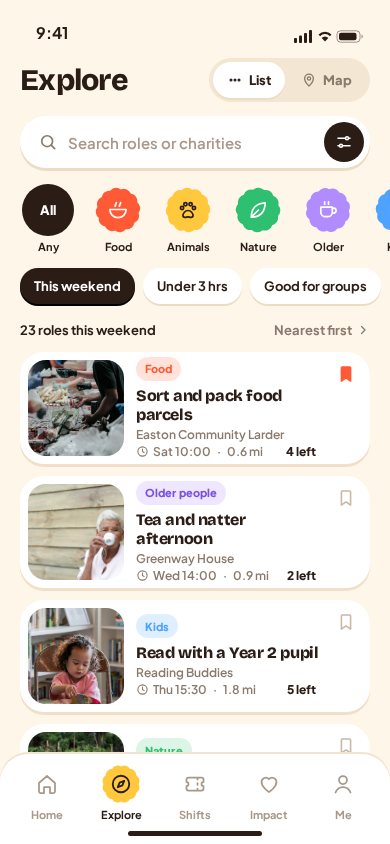
Kindly is a complete local volunteering app: welcome, picking causes, sign in, a home with your next shift ticket, explore with a list and a map of rosette pins, an opportunity, a charity page, picking a shift, confirming and a booked screen, your shifts, a day of check in with a route and a QR pass, a live shift timer, a thank you note, logging hours, an impact dashboard, rosette badges, teams, a team page, a charity story, notifications, Kindly Plus, profile and settings. Warm oat and white with tomato, sunflower and four more cause colours.
| Detail | Value |
|---|---|
| Screen type | Search |
| App | Kindly: Volunteering near you |
| Category | Social |
| Design language | Playful, light |
| Type | Bricolage Grotesque for headings, Plus Jakarta Sans for text |
| Colours | #fff6ea background, #ffffff surface, #2b1d16 text, #8a7a6c text-muted, #ff5a36 accent, #ffffff accent-contrast, #ffc83d secondary, #f1e3cf border, #e5484d danger |
What this screen says
- Explore
- List Map
- Search roles or charities
- All Any
- Food
- Animals
- Nature
- Older
- Kids
- Homes
- This weekend Under 3 hrs Good for groups
- 23 roles this weekend Nearest first
- Sort and pack food parcels
- Easton Community Larder
- Sat 10:00· 0.6 mi4 left
- Older people
- Tea and natter afternoon
- Greenway House
- Wed 14:00· 0.9 mi2 left
- Read with a Year 2 pupil
- Reading Buddies
- Thu 15:30· 1.8 mi5 left
- Plant the winter beds
- Growing Space
- Sun 11:00· 1.1 mi9 left
- Home
- Shifts
- Impact
- Me
Around it in Kindly
More search and explore screens
- Nearly Explore: Dating by crossed paths
- Linkup Search: Professional network and jobs
- Quorum Search: Questions and expert answers
- Backer Explore: Support creators with memberships
- Pledge Search: Back creative projects
- Civic New report: Report issues and city services
- Guild Discover: Community servers with voice and text chat
- Parrot New chat: Private messaging, groups and calls
- Carrier Discover: Cloud messaging with channels
- Vista Explore: Photos, stories and reels
- Flick Discover: Short video feed
- Squawk Explore: Short posts and live conversation
Every social app search screen
What makes a good search screen
- Show something before people type. Recent searches, popular items or categories make the empty search screen useful and save typing.
- Suggest as people type. Autocomplete with matching items, not only matching words, lets people jump straight to a result.
- Make filters visible and reversible. Show active filters as chips that can be removed in one tap, and the number of results as filters change.
- Forgive typos. Close matches and "Did you mean" stop a spelling mistake from ending in an empty screen.
The full search screen guide and every example
Remix Kindly free: describe your own app and it is drawn in this design. Or get its files from $10: Figma, React Native, SwiftUI, Flutter and HTML.