Templates · Live tracking screens · Fitness app · Kilo
Kilo Rest timer screen
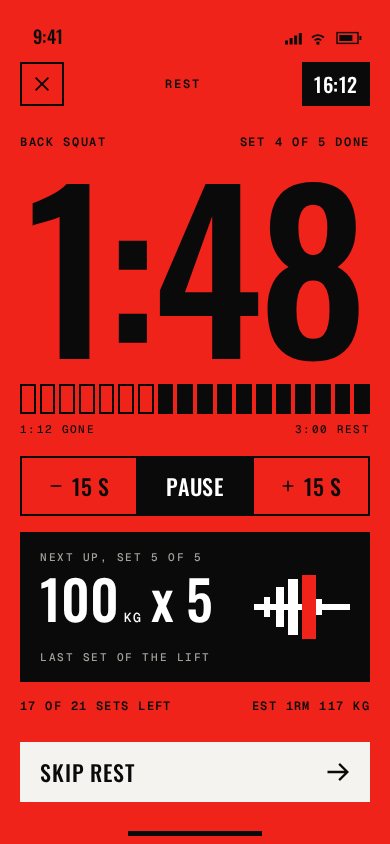
A tracking screen from Kilo, a strength training log app template in a Brutalist style. Screen 8 of 25.
Kilo is a complete lifting log: welcome, sign in, a short setup, today's workout, a live session with a set table and a rest timer, a plate calculator that draws the loaded bar, an exercise library, lift history, a finished session and a new record. Around it sit history, records, programs, weekly volume and body stats, a weigh in, a Pro plan, notifications, profile and settings. Everything is kilograms, reps and big numbers.
| Detail | Value |
|---|---|
| Screen type | Tracking |
| App | Kilo: Strength training log |
| Category | Health and fitness |
| Design language | Brutalist, light |
| Type | Oswald |
| Colours | #f4f3ef background, #ffffff surface, #0a0a0a text, #6e6c66 text-muted, #f0231b accent, #ffffff accent-contrast, #0a0a0a secondary, #0a0a0a border, #f0231b danger |
What this screen says
- Rest
- Back squat Set 4 of 5 done
- 1:12 gone 3:00 rest
- 15 s
- Pause
- Next up, set 5 of 5
- 100kgx 5
- Last set of the lift
- 17 of 21 sets left Est 1RM 117 kg
- Skip rest
Around it in Kilo
More live tracking screens
- Locker Live class: Gym membership and class booking
- Dew Step: AI skin scan and routine
- Cradle Feeding timer: Baby tracker
- Donor Recovery: Blood donation, counted drop by drop
- Unfold Breath timer: Yoga and stretching
- Cyra Temperature: Cycle tracker
- Harbor Breathing: Therapy and mood
- Fasten Water: Intermittent fasting
- Plate Water: Calorie and macro tracker
- Forge Live workout: AI fitness and nutrition
- Lull Breathe: Sleep sounds and meditation
- Pace Heart rate: Fitness tracker
Every fitness app tracking screen
What makes a good live tracking screen
- The live number is the hero. Arrival time, pace, distance or time left, in large type at the top or centre.
- Show status in words. "Driver is 3 minutes away" or "Halfway there" alongside the map or chart.
- Make it readable while moving. Large numbers, high contrast and big buttons for pause, stop or call.
- Keep updates calm. Smooth movement on the map and steady numbers; jumpy updates feel broken.
The full live tracking screen guide and every example
Remix Kilo free: describe your own app and it is drawn in this design. Or get its files from $10: Figma, React Native, SwiftUI, Flutter and HTML.