Templates · List and feed screens · Productivity app · Keyring
Keyring Alerts screen
A list screen from Keyring, a password manager app template in a Dark-first style. Screen 22 of 25.
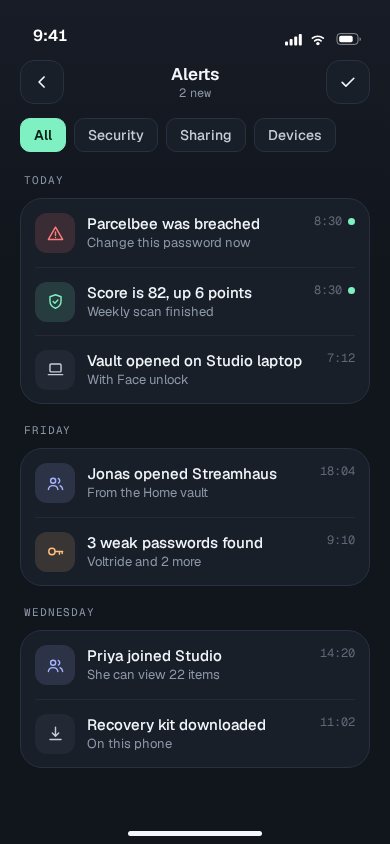
Keyring is a complete password manager: welcome, sign in, a master password with a strength meter, a recovery kit, passcode unlock, the vault home, search, every login, a login with its one-time code and history, new items, a password generator, cards, secure notes, a security score with weak, reused and breached passwords, a breach alert, autofill setup, shared vaults and sharing an item, alerts, a Plus plan, profile and settings. Mint means safe, apricot means weak and coral means breached.
| Detail | Value |
|---|---|
| Screen type | List |
| App | Keyring: Password manager |
| Category | Productivity |
| Design language | Dark-first, dark |
| Type | Geist |
| Colours | #11151c background, #191f29 surface, #f3f6fa text, #8c97a8 text-muted, #7ef0c1 accent, #0a1f18 accent-contrast, #a7b4ff secondary, #283140 border, #ff7d7d danger |
What this screen says
- Alerts
- 2 new
- All Security Sharing Devices
- Today
- Parcelbee was breached
- Change this password now
- Score is 82, up 6 points
- Weekly scan finished
- Vault opened on Studio laptop
- With Face unlock
- Friday
- Jonas opened Streamhaus
- From the Home vault
- 3 weak passwords found
- Voltride and 2 more
- Wednesday
- Priya joined Studio
- She can view 22 items
- Recovery kit downloaded
- On this phone
Around it in Keyring
More list and feed screens
- Canvas Files: Design files and comments on mobile
- Merge Inbox: Code, pull requests and reviews
- Query Sources: AI answers with sources
- Glossa History: Translate text, voice and camera
- Layout Uploads: Design anything from templates
- Tick Inbox: To-do lists and reminders
- Beacon Devices: Find your devices and people
- Staffroom Inbox: HR, payslips and time off
- Slot Calendar: Booking links and meeting scheduling
- Sheet Base: Spreadsheets and databases
- Tunnel Specialty servers: VPN and online privacy
- Ping History: Internet speed test
Every productivity app list screen
What makes a good list screen
- Show what people need to decide. Each row should carry just enough to choose: a title, one or two details and a status. Everything else belongs on the detail screen.
- Keep rows consistent. The same information in the same place on every row lets people scan down a column instead of reading each item.
- Group with headings. Dates, categories or status headings break long lists into chunks people can skip through.
- Make common actions quick. Swipe actions, a checkbox or a heart on the row save opening the item for small tasks.
The full list screen guide and every example
Remix Keyring free: describe your own app and it is drawn in this design. Or get its files from $10: Figma, React Native, SwiftUI, Flutter and HTML.