Templates · List and feed screens · Productivity app · Query
Query Sources screen
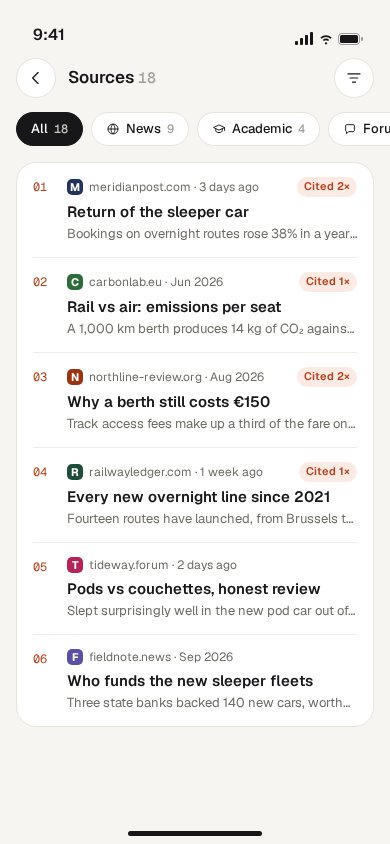
A list screen from Query, an AI answers with sources app template in a Minimal style. Screen 8 of 25.
Query is a complete answer engine: welcome, topics, sign in, a home with the ask bar, a search composer, live searching, a cited answer, all sources, a source preview, a follow-up thread, images, deep research and its report, Discover stories, a library, spaces, a market page, voice mode, a Pro plan with checkout and confirmation, notifications, profile and settings. Paper white and ink with one vermilion accent for citations.
| Detail | Value |
|---|---|
| Screen type | List |
| App | Query: AI answers with sources |
| Category | Productivity |
| Design language | Minimal, light |
| Type | Instrument Serif for headings, Geist for text |
| Colours | #f6f5f1 background, #ffffff surface, #17171a text, #6e6c66 text-muted, #e4572e accent, #fcebe4 accent-tint, #b53f1b accent-dark, #e7e4dc border, #2f8a57 success |
What this screen says
- Sources 18
- All 18 News 9 Academic 4 Forums 3
- M meridianpost.com · 3 days agoCited 2×
- Return of the sleeper car
- Bookings on overnight routes rose 38% in a year as…
- C carbonlab.eu · Jun 2026Cited 1×
- Rail vs air: emissions per seat
- A 1,000 km berth produces 14 kg of CO₂ against…
- N northline-review.org · Aug 2026Cited 2×
- Why a berth still costs €150
- Track access fees make up a third of the fare on…
- R railwayledger.com · 1 week agoCited 1×
- Every new overnight line since 2021
- Fourteen routes have launched, from Brussels to…
- T tideway.forum · 2 days ago
- Pods vs couchettes, honest review
- Slept surprisingly well in the new pod car out of…
- F fieldnote.news · Sep 2026
- Who funds the new sleeper fleets
- Three state banks backed 140 new cars, worth…
Around it in Query
More list and feed screens
- Sheet Base: Spreadsheets and databases
- Tunnel Specialty servers: VPN and online privacy
- Ping History: Internet speed test
- Glance History: Visual search with the camera
- Replay Library: Record and share screen videos
- Easel Templates: Collaborative whiteboard
- Token Requests: Two-factor codes and sign-in approvals
- Beam Transfers: Send big files
- Parchment Files: Documents, edit and share
- Lectern New deck: Slides and presenter remote
- Ringer Recents: Phone, contacts and voicemail
- Pipeline: Sales CRM on the road
Every productivity app list screen
What makes a good list screen
- Show what people need to decide. Each row should carry just enough to choose: a title, one or two details and a status. Everything else belongs on the detail screen.
- Keep rows consistent. The same information in the same place on every row lets people scan down a column instead of reading each item.
- Group with headings. Dates, categories or status headings break long lists into chunks people can skip through.
- Make common actions quick. Swipe actions, a checkbox or a heart on the row save opening the item for small tasks.
The full list screen guide and every example
Remix Query free: describe your own app and it is drawn in this design. Or get its files from $10: Figma, React Native, SwiftUI, Flutter and HTML.