Templates · Form and input screens · Travel app · Keycard
Keycard Requests screen
A form screen from Keycard, a travel app template in a Luxury style. Screen 19 of 25.
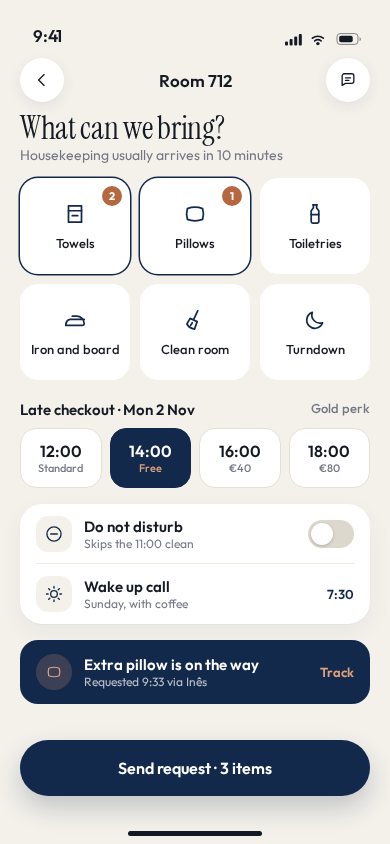
Keycard is a complete hotel stay app: welcome, sign in, a home built around the stay you are in, search, results, a hotel page, room rates, booking review and confirmation, your stays, a stay with its details, mobile check in, a digital room key, in room dining with a dish, an order and live order status, a chat with the front desk, housekeeping requests, the bill, rewards with elite status, a paid Reserve membership, notifications, profile and settings. Linen and white with harbour navy and burnished copper.
| Detail | Value |
|---|---|
| Screen type | Form |
| App | Keycard: Hotel stays, digital key and room service |
| Category | Travel |
| Design language | Luxury, light |
| Type | Instrument Serif for headings, Outfit for text |
| Colours | #f4f1eb background, #ffffff surface, #141a24 text, #737785 text-muted, #b5683f accent, #ffffff accent-contrast, #13294b secondary, #e5e0d6 border, #c0432f danger |
What this screen says
- Room 712
- What can we bring?
- Housekeeping usually arrives in 10 minutes
- Towels2
- Pillows1
- Toiletries
- Iron and board
- Clean room
- Turndown
- Late checkout · Mon 2 NovGold perk
- 12:00Standard 14:00Free 16:00€40 18:00€80
- Do not disturb
- Skips the 11:00 clean
- Wake up call
- Sunday, with coffee
- Extra pillow is on the way
- Requested 9:33 via Inês
- Track
- Send request · 3 items
Around it in Keycard
More form and input screens
- Layover Add flight: Airport guide, gates and lounges
- Permit Apply for e-visa: Visas and travel documents wallet
- Backroad Add stop: Road trip planner with stops
- Bunk Host a meetup: Hostels and backpacker meetups
- Piazza Rate walk: Self-guided city walking tours
- Fjord Reserve table: Cruise companion on board
- Atlas Add a review: Maps and navigation
- Hollow Guests: Cabin and boutique stays
- Aloft Check in: Flight tracker
- Hail Set pickup: Ride hailing
- Volta Filters: EV charging
- Roamly Filters: Trips, stays and experiences
What makes a good form screen
- Ask only what you need. Every field is a reason to stop. Remove optional fields or move them to later.
- Labels above fields. Visible labels stay readable while people type; placeholder-only labels disappear.
- Use the right keyboard and input. Number pads for amounts, email keyboards for email, pickers for dates and autofill for addresses and codes.
- Validate as people go. Show problems next to the field when people leave it, in words that say how to fix them.
The full form screen guide and every example
Remix Keycard free: describe your own app and it is drawn in this design. Or get its files from $10: Figma, React Native, SwiftUI, Flutter and HTML.