Templates · List and feed screens · Travel app · Keycard
Keycard Bill screen
A list screen from Keycard, a travel app template in a Luxury style. Screen 20 of 25.
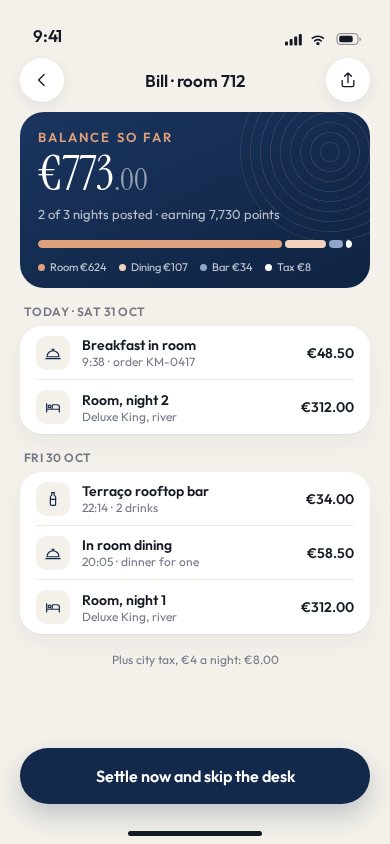
Keycard is a complete hotel stay app: welcome, sign in, a home built around the stay you are in, search, results, a hotel page, room rates, booking review and confirmation, your stays, a stay with its details, mobile check in, a digital room key, in room dining with a dish, an order and live order status, a chat with the front desk, housekeeping requests, the bill, rewards with elite status, a paid Reserve membership, notifications, profile and settings. Linen and white with harbour navy and burnished copper.
| Detail | Value |
|---|---|
| Screen type | List |
| App | Keycard: Hotel stays, digital key and room service |
| Category | Travel |
| Design language | Luxury, light |
| Type | Instrument Serif for headings, Outfit for text |
| Colours | #f4f1eb background, #ffffff surface, #141a24 text, #737785 text-muted, #b5683f accent, #ffffff accent-contrast, #13294b secondary, #e5e0d6 border, #c0432f danger |
What this screen says
- Bill · room 712
- Balance so far
- 2 of 3 nights posted · earning 7,730 points
- Room €624 Dining €107 Bar €34 Tax €8
- TODAY · SAT 31 OCT
- Breakfast in room
- 9:38 · order KM-0417
- Room, night 2
- Deluxe King, river
- FRI 30 OCT
- Terraço rooftop bar
- 22:14 · 2 drinks
- In room dining
- 20:05 · dinner for one
- Room, night 1
- Plus city tax, €4 a night: €8.00
- Settle now and skip the desk
Around it in Keycard
More list and feed screens
- Volta Notifications: EV charging
- Museo Notifications: Museum guide
- Roamly Reviews: Trips, stays and experiences
- Jaunt Buses: Bus, train and flight booking
- Spoke Journeys: Bike sharing
- Navara Trips: Yacht charter
- Voya Results: Travel booking
- Wheelhouse Trips: Driver app for ride hailing
- Fuelup Fuel prices: Pay at the pump and car wash
- Omnia Mart: Super app for rides, food and payments
- Staya Reviews: Homes and stays from local hosts
- Lodge Reviews: Hotels, deals and reservations
What makes a good list screen
- Show what people need to decide. Each row should carry just enough to choose: a title, one or two details and a status. Everything else belongs on the detail screen.
- Keep rows consistent. The same information in the same place on every row lets people scan down a column instead of reading each item.
- Group with headings. Dates, categories or status headings break long lists into chunks people can skip through.
- Make common actions quick. Swipe actions, a checkbox or a heart on the row save opening the item for small tasks.
The full list screen guide and every example
Remix Keycard free: describe your own app and it is drawn in this design. Or get its files from $10: Figma, React Native, SwiftUI, Flutter and HTML.