Templates · Form and input screens · Travel app · Permit
Permit Apply for e-visa screen
A form screen from Permit, a visas and travel documents wallet app template in a Clinical style. Screen 11 of 25.
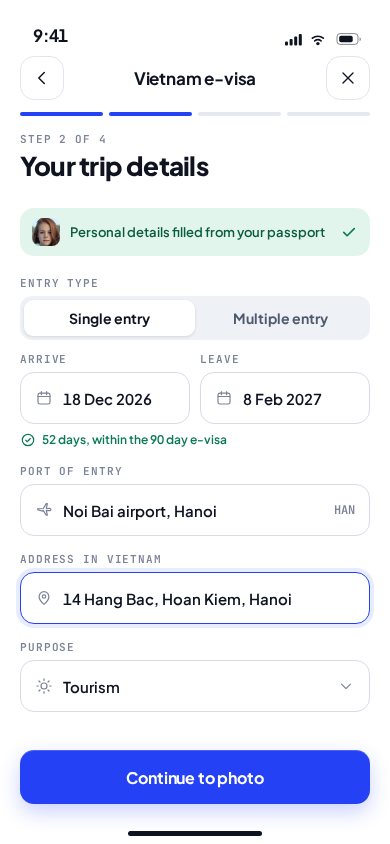
Permit is a complete travel documents wallet: welcome, sign in, a passport scan, a wallet of passports, visas and cards, the passport data page, every document, a trip with entry readiness per country, an entry requirements check and the rules for one country, a travel authorisation, an e-visa application with a compliant photo, review and pay and a submitted screen, live application status, a 90 in 180 day stay counter, a validity timeline, add a document, a secure share link, border mode, family passports, alerts, a Plus plan, profile and settings. Paper grey and white with cobalt, navy and quiet status colours.
| Detail | Value |
|---|---|
| Screen type | Form |
| App | Permit: Visas and travel documents wallet |
| Category | Travel |
| Design language | Clinical, light |
| Type | JetBrains Mono for headings, Plus Jakarta Sans for text |
| Colours | #eef1f5 background, #ffffff surface, #0d1420 text, #5d6778 text-muted, #2541f5 accent, #ffffff accent-contrast, #14213d secondary, #e1e6ee border, #c42a30 danger, #0b7a55 success, #9a5a00 warning |
What this screen says
- Vietnam e-visa
- Step 2 of 4
- Your trip details
- Personal details filled from your passport
- Entry type
- Single entry Multiple entry
- Arrive
- 18 Dec 2026
- Leave
- 8 Feb 2027
- 52 days, within the 90 day e-visa
- Port of entry
- Noi Bai airport, HanoiHAN
- Address in Vietnam
- 14 Hang Bac, Hoan Kiem, Hanoi
- Purpose
- Tourism
- Continue to photo
Around it in Permit
More form and input screens
- Keycard Check in: Hotel stays, digital key and room service
- Detour Report: Community driving navigation
- Convoy Offer a ride: Carpooling between cities
- Manifest Add plan: Trip plans from your confirmation emails
- Roadster Charge schedule: Your electric car, from your phone
- Fairground Virtual queue: Theme park tickets, wait times and map
- Scoot Wallet: E-scooter and e-bike rental
- Nomad Turn on data: Travel eSIM data plans
- Tern Seats: Ferry and island hopping
- Berth Extras: Night trains and sleeper cabins
- Caravan Pickup: Campervan rental and road trips
- Layover Add flight: Airport guide, gates and lounges
What makes a good form screen
- Ask only what you need. Every field is a reason to stop. Remove optional fields or move them to later.
- Labels above fields. Visible labels stay readable while people type; placeholder-only labels disappear.
- Use the right keyboard and input. Number pads for amounts, email keyboards for email, pickers for dates and autofill for addresses and codes.
- Validate as people go. Show problems next to the field when people leave it, in words that say how to fix them.
The full form screen guide and every example
Remix Permit free: describe your own app and it is drawn in this design. Or get its files from $10: Figma, React Native, SwiftUI, Flutter and HTML.