Templates · Form and input screens · Travel app · Volta
Volta Filters screen
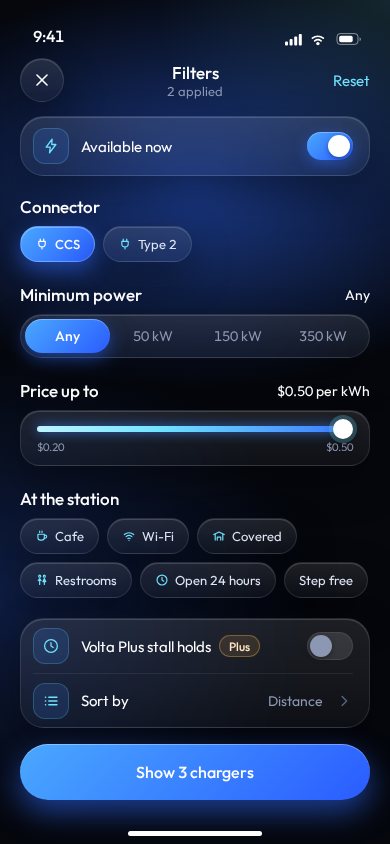
A form screen from Volta, an EV charging app template in a Glass style. Screen 8 of 25.
Volta is a complete EV charging app: welcome, sign in, a code and adding your car, a home with the live charge, a charger map with filters, nearby stations, a station with its stalls, picking a connector, plugging in, a live session, the finished charge and its receipt, a trip planner with charging stops, car status, a home charging schedule, energy stats, history, wallet, a Plus plan, notifications, profile and settings. One electric blue for everything that carries current.
| Detail | Value |
|---|---|
| Screen type | Form |
| App | Volta: EV charging |
| Category | Travel |
| Design language | Glass, dark |
| Type | Outfit |
| Colours | #05070d background, #111624 surface, #ffffff text, #8b97b3 text-muted, #3d8bff accent, #ffffff accent-contrast, #6fe3ff secondary, #232a3c border, #ff5f6e danger |
What this screen says
- Filters2 applied
- Reset
- Available now
- Connector
- CCS Type 2
- Minimum power
- Any
- Any 50 kW 150 kW 350 kW
- Price up to
- $0.50 per kWh
- At the station
- Cafe Wi-Fi Covered Restrooms Open 24 hours Step free
- Volta Plus stall holdsPlus
- Sort by
- Distance
- Show 3 chargers
Around it in Volta
More form and input screens
- Jaunt Filters: Bus, train and flight booking
- Spoke End ride: Bike sharing
- Wheelhouse Messages: Driver app for ride hailing
- Fuelup Pick a pump: Pay at the pump and car wash
- Omnia Rate trip: Super app for rides, food and payments
- Staya Dates: Homes and stays from local hosts
- Lodge Dates: Hotels, deals and reservations
- Fare Dates: Flight search and price alerts
- Rove Write a review: Reviews and things to do
- Ignition Driver check: Car rental from local hosts
- Contrail Dates: Airline booking, check-in and boarding
- Keycard Check in: Hotel stays, digital key and room service
What makes a good form screen
- Ask only what you need. Every field is a reason to stop. Remove optional fields or move them to later.
- Labels above fields. Visible labels stay readable while people type; placeholder-only labels disappear.
- Use the right keyboard and input. Number pads for amounts, email keyboards for email, pickers for dates and autofill for addresses and codes.
- Validate as people go. Show problems next to the field when people leave it, in words that say how to fix them.
The full form screen guide and every example
Remix Volta free: describe your own app and it is drawn in this design. Or get its files from $10: Figma, React Native, SwiftUI, Flutter and HTML.