Templates · List and feed screens · Productivity app · Frontdesk
Frontdesk Views screen
A list screen from Frontdesk, a customer support inbox app template in an Enterprise style. Screen 4 of 25.
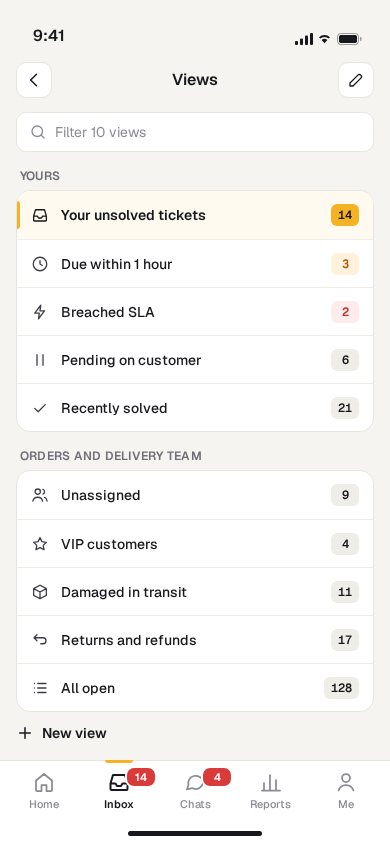
Frontdesk is a complete support agent app: welcome, sign in, a home with your queue and tickets at risk, saved views, an inbox sorted by SLA, a ticket thread with internal notes, the customer card, a reply with macros, mentions, assign and tag, a solved screen, live chats with a running conversation, a voice call with a live transcript, search, the customer's order with a partial refund, team performance, satisfaction ratings, the team, notifications, a Pro plan, profile and settings. Warm paper and white with ink and marigold.
| Detail | Value |
|---|---|
| Screen type | List |
| App | Frontdesk: Customer support inbox |
| Category | Productivity |
| Design language | Enterprise, light |
| Type | Geist |
| Colours | #f5f4f0 background, #ffffff surface, #17181c text, #6e6f78 text-muted, #f4b324 accent, #17181c accent-contrast, #17181c secondary, #e7e5df border, #d93a3a danger |
What this screen says
- Views
- Filter 10 views
- Yours
- Your unsolved tickets 14
- Due within 1 hour 3
- Breached SLA 2
- Pending on customer 6
- Recently solved 21
- Orders and delivery team
- Unassigned 9
- VIP customers 4
- Damaged in transit 11
- Returns and refunds 17
- All open 128
- New view
- Home
- 14Inbox
- 4Chats
- Reports
- Me
Around it in Frontdesk
More list and feed screens
- Outpost Calendar: Schedule social posts
- Pageview Reports: Website analytics
- Polish Documents: Writing assistant and keyboard
- Tapline Links: Link-in-bio pages and analytics
- Quill Pages: Docs, wikis and databases in one workspace
- Tandem Messages: Team chat, channels and huddles
- Shipyard Inbox: Issue tracking for product teams
- Canvas Files: Design files and comments on mobile
- Merge Inbox: Code, pull requests and reviews
- Query Sources: AI answers with sources
- Glossa History: Translate text, voice and camera
- Layout Uploads: Design anything from templates
Every productivity app list screen
What makes a good list screen
- Show what people need to decide. Each row should carry just enough to choose: a title, one or two details and a status. Everything else belongs on the detail screen.
- Keep rows consistent. The same information in the same place on every row lets people scan down a column instead of reading each item.
- Group with headings. Dates, categories or status headings break long lists into chunks people can skip through.
- Make common actions quick. Swipe actions, a checkbox or a heart on the row save opening the item for small tasks.
The full list screen guide and every example
Remix Frontdesk free: describe your own app and it is drawn in this design. Or get its files from $10: Figma, React Native, SwiftUI, Flutter and HTML.