Templates · List and feed screens · Productivity app · Campaign
Campaigns screen
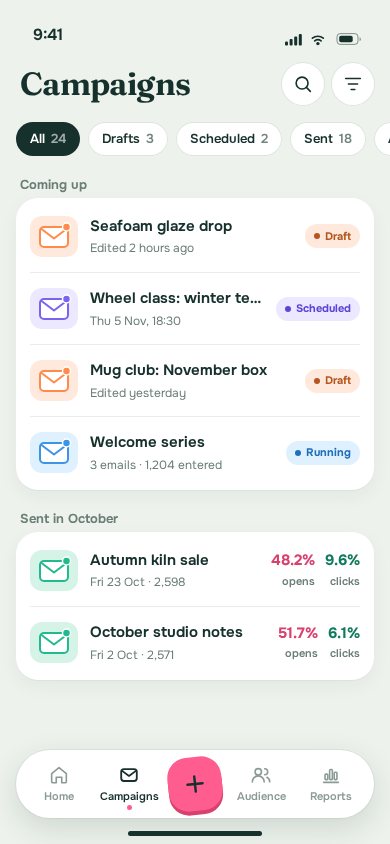
A list screen from Campaign, an email marketing campaigns app template in a Playful style. Screen 5 of 25.
Campaign is a complete email marketing app for a small pottery studio: welcome, sign in and business setup, a home with this week's sends and audience growth, campaigns, a campaign checklist, new campaign, subject line and preview text with an inbox preview, a block email builder with an add block sheet, a phone preview, send test, schedule with a best time to send, review and a scheduled confirmation, a report with opens and clicks, a click map, audience with tags, a segment builder, a contact, an automation journey, a landing page, plans, notifications and settings. Pale sage and white with deep spruce, bubblegum pink, mint and lavender.
| Detail | Value |
|---|---|
| Screen type | List |
| App | Campaign: Email marketing campaigns |
| Category | Productivity |
| Design language | Playful, light |
| Type | Fraunces for headings, Onest for text |
| Colours | #edf2ec background, #ffffff surface, #16302b text, #6a7d76 text-muted, #ff5d8f accent, #16302b accent-contrast, #23b98f secondary, #dce5de border, #e5484d danger |
What this screen says
- Campaigns
- All 24 Drafts 3 Scheduled 2 Sent 18 Automations
- Coming up
- Seafoam glaze dropEdited 2 hours ago
- Draft
- Wheel class: winter termThu 5 Nov, 18:30
- Scheduled
- Mug club: November boxEdited yesterday
- Welcome series3 emails · 1,204 entered
- Running
- Sent in October
- Autumn kiln saleFri 23 Oct · 2,598
- 48.2%opens
- 9.6%clicks
- October studio notesFri 2 Oct · 2,571
- 51.7%opens
- 6.1%clicks
- Home
- Audience
- Reports
Around it in Campaign
More list and feed screens
- Pageview Reports: Website analytics
- Polish Documents: Writing assistant and keyboard
- Tapline Links: Link-in-bio pages and analytics
- Quill Pages: Docs, wikis and databases in one workspace
- Tandem Messages: Team chat, channels and huddles
- Shipyard Inbox: Issue tracking for product teams
- Canvas Files: Design files and comments on mobile
- Merge Inbox: Code, pull requests and reviews
- Query Sources: AI answers with sources
- Glossa History: Translate text, voice and camera
- Layout Uploads: Design anything from templates
- Tick Inbox: To-do lists and reminders
Every productivity app list screen
What makes a good list screen
- Show what people need to decide. Each row should carry just enough to choose: a title, one or two details and a status. Everything else belongs on the detail screen.
- Keep rows consistent. The same information in the same place on every row lets people scan down a column instead of reading each item.
- Group with headings. Dates, categories or status headings break long lists into chunks people can skip through.
- Make common actions quick. Swipe actions, a checkbox or a heart on the row save opening the item for small tasks.
The full list screen guide and every example
Remix Campaign free: describe your own app and it is drawn in this design. Or get its files from $10: Figma, React Native, SwiftUI, Flutter and HTML.