Templates · List and feed screens · Productivity app · Inkline
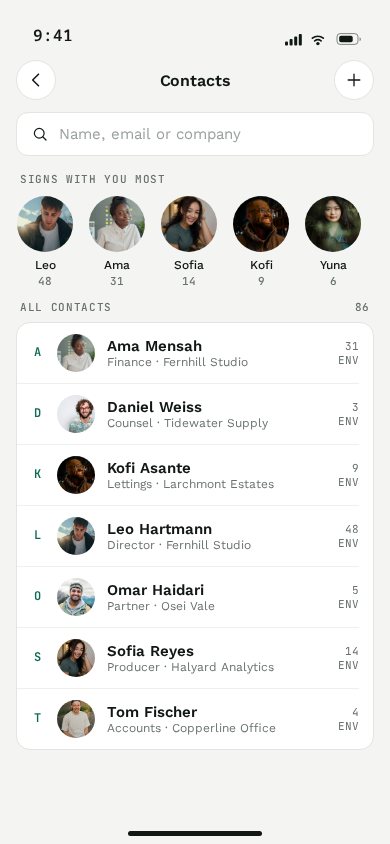
Inkline Contacts screen
A list screen from Inkline, a sign and send contracts app template in a Clinical style. Screen 20 of 25.
Inkline is a complete contract signing app: welcome, sign in, adopting a signature, a home with what needs your signature, an inbox of envelopes, an envelope with its signer chain, a document viewer with sign here flags, a signature pad, finish and signed, then sending your own: upload, recipients and signing order, placing fields on the page, review and sent, live status as a signer reads, the audit trail certificate, templates, search, contacts, turnaround insights, plans, notifications, profile and settings. Paper white and hairlines with deep viridian ink and amber flags.
| Detail | Value |
|---|---|
| Screen type | List |
| App | Inkline: Sign and send contracts |
| Category | Productivity |
| Design language | Clinical, light |
| Type | Instrument Serif for headings, Work Sans for text |
| Colours | #f4f5f2 background, #ffffff surface, #111714 text, #69726d text-muted, #0d6b57 accent, #e3f0eb accent-soft, #f5b638 secondary, #e2e5e0 border, #b23a2e danger |
What this screen says
- Contacts
- Name, email or company
- Signs with you most
- Leo48
- Ama31
- Sofia14
- Kofi9
- Yuna6
- All contacts 86
- Ama Mensah
- Finance · Fernhill Studio
- ENV
- Daniel Weiss
- Counsel · Tidewater Supply
- Kofi Asante
- Lettings · Larchmont Estates
- Leo Hartmann
- Director · Fernhill Studio
- Omar Haidari
- Partner · Osei Vale
- Sofia Reyes
- Producer · Halyard Analytics
- Tom Fischer
- Accounts · Copperline Office
Around it in Inkline
More list and feed screens
- Replay Library: Record and share screen videos
- Easel Templates: Collaborative whiteboard
- Token Requests: Two-factor codes and sign-in approvals
- Beam Transfers: Send big files
- Parchment Files: Documents, edit and share
- Lectern New deck: Slides and presenter remote
- Ringer Recents: Phone, contacts and voicemail
- Pipeline: Sales CRM on the road
- Aim Objectives: Goals and key results
- Scribe Action items: Voice memos to notes
- Dispatch Jobs: Field service jobs for technicians
- Stash Library: Read-it-later and highlights
Every productivity app list screen
What makes a good list screen
- Show what people need to decide. Each row should carry just enough to choose: a title, one or two details and a status. Everything else belongs on the detail screen.
- Keep rows consistent. The same information in the same place on every row lets people scan down a column instead of reading each item.
- Group with headings. Dates, categories or status headings break long lists into chunks people can skip through.
- Make common actions quick. Swipe actions, a checkbox or a heart on the row save opening the item for small tasks.
The full list screen guide and every example
Remix Inkline free: describe your own app and it is drawn in this design. Or get its files from $10: Figma, React Native, SwiftUI, Flutter and HTML.