Templates · List and feed screens · Productivity app · Aim
Aim Objectives screen
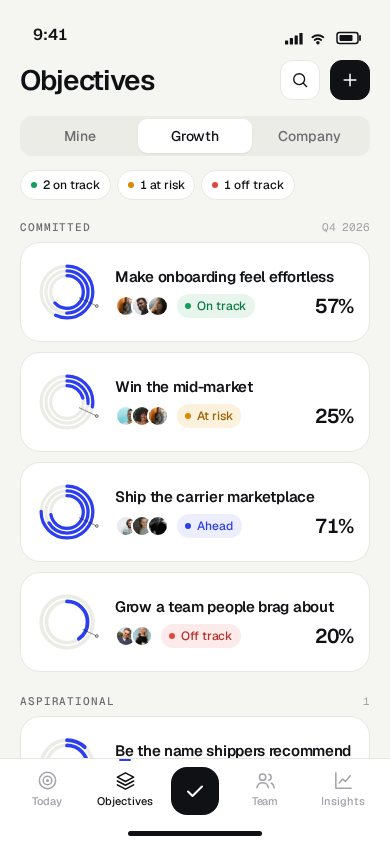
A list screen from Aim, a goals and key results app template in a Minimal style. Screen 5 of 25.
Aim is a complete objectives and key results app: welcome, setup and sign in, a today view with the quarter ruler, objectives and key result pages, a weekly check-in with confidence and a saved screen, new objectives and key results, an alignment tree, insights, team and teammate pages, search, a focus timer, a quarter close with grades, an updates feed, an audio weekly brief, plans, notifications, profile and settings. Paper white and ink with a single cobalt accent and quiet green, amber and red for status.
| Detail | Value |
|---|---|
| Screen type | List |
| App | Aim: Goals and key results |
| Category | Productivity |
| Design language | Minimal, light |
| Type | Geist Mono for headings, Geist for text |
| Colours | #f5f5f2 background, #ffffff surface, #101114 text, #6c6d73 text-muted, #2b3ff0 accent, #ffffff accent-contrast, #eceefe secondary, #e7e7e2 border, #149e5c success, #d98a00 warning, #e0473f danger |
What this screen says
- Objectives
- Mine Growth Company
- 2 on track 1 at risk 1 off track
- Committed Q4 2026
- Make onboarding feel effortless
- On track 57%
- Win the mid-market
- At risk 25%
- Ship the carrier marketplace
- Ahead 71%
- Grow a team people brag about
- Off track 20%
- Aspirational 1
- Be the name shippers recommend
- Stretch 21%
- Today
- Team
- Insights
Around it in Aim
More list and feed screens
- Sheet Base: Spreadsheets and databases
- Tunnel Specialty servers: VPN and online privacy
- Ping History: Internet speed test
- Glance History: Visual search with the camera
- Replay Library: Record and share screen videos
- Easel Templates: Collaborative whiteboard
- Token Requests: Two-factor codes and sign-in approvals
- Beam Transfers: Send big files
- Parchment Files: Documents, edit and share
- Lectern New deck: Slides and presenter remote
- Ringer Recents: Phone, contacts and voicemail
- Pipeline: Sales CRM on the road
Every productivity app list screen
What makes a good list screen
- Show what people need to decide. Each row should carry just enough to choose: a title, one or two details and a status. Everything else belongs on the detail screen.
- Keep rows consistent. The same information in the same place on every row lets people scan down a column instead of reading each item.
- Group with headings. Dates, categories or status headings break long lists into chunks people can skip through.
- Make common actions quick. Swipe actions, a checkbox or a heart on the row save opening the item for small tasks.
The full list screen guide and every example
Remix Aim free: describe your own app and it is drawn in this design. Or get its files from $10: Figma, React Native, SwiftUI, Flutter and HTML.