Templates · Detail screens · Lifestyle app · Inked
Inked Appointment screen
A detail screen from Inked, a tattoo artists and bookings app template in a Dark-first style. Screen 17 of 25.
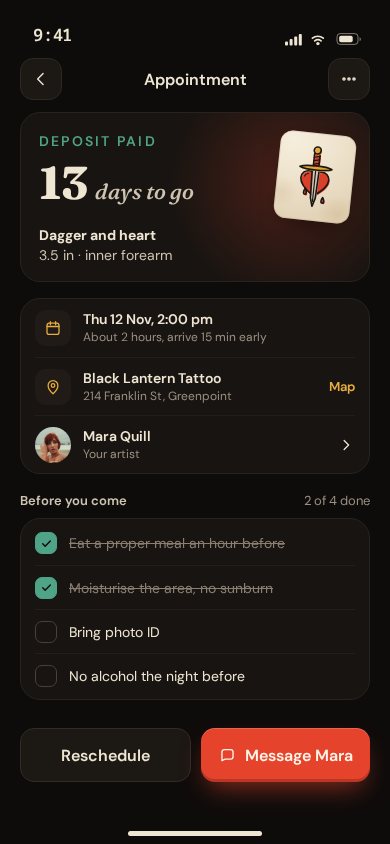
Inked is a complete tattoo app: welcome and style picks, sign in, a home with your next session and today's flash drop, explore and a studio map, artist pages with a portfolio, a healed piece, a flash sheet and a flash design, a stencil try on, a custom request, booking a slot, paying the deposit and the confirmation, appointments and session prep, messages with sketch approval, an aftercare tracker, your collection, notifications, Inked Plus, profile and settings. Warm ink black and bone with flash red, mustard and jade.
| Detail | Value |
|---|---|
| Screen type | Detail |
| App | Inked: Tattoo artists and bookings |
| Category | Lifestyle |
| Design language | Dark-first, dark |
| Type | Fraunces for headings, DM Sans for text |
| Colours | #0e0c0b background, #181411 surface, #efe5d3 text, #9a8f80 text-muted, #e5432c accent, #fff6ea accent-contrast, #efe4cf secondary, #2a231d border, #e8ad3f warning, #4fa386 success |
What this screen says
- Appointment
- Deposit paid
- 13 days to go
- Dagger and heart
- 3.5 in · inner forearm
- Thu 12 Nov, 2:00 pmAbout 2 hours, arrive 15 min early
- Black Lantern Tattoo214 Franklin St, Greenpoint Map
- Mara QuillYour artist
- Before you come2 of 4 done
- Eat a proper meal an hour before
- Moisturise the area, no sunburn
- Bring photo ID
- No alcohol the night before
- Reschedule
- Message Mara
Around it in Inked
More detail screens
- Kibble Product: Pet supplies and autoship
- Filmlog Film: Film diary and reviews
- Guardrail Child: Parental controls and screen time
- Collar Escape alert: GPS pet tracker
- Postage Item: Send parcels and find drop-off points
- Specs Frame: Glasses with virtual try-on
- Circuit Product: Electronics store with trade-in and repairs
- Provenance Item: Authenticated luxury resale
- Gavel Lot: Live online auctions
- Tidy Deep clean: Book home cleaners
- Dorm Property: Find student housing
- Hem Quote: Tailoring and alterations, collected
Every lifestyle app detail screen
What makes a good detail screen
- Lead with what identifies the item. A large image or title, the price or status, and the key facts at the top. People should know they are in the right place at a glance.
- Keep the main action visible. A sticky bottom button for Add to cart, Book or Play stays reachable while people scroll through details.
- Order information by importance. The facts that decide the choice come first; reviews, specifications and fine print further down.
- Use progressive disclosure. Long descriptions, specifications and policies can expand on tap rather than filling the screen.
The full detail screen guide and every example
Remix Inked free: describe your own app and it is drawn in this design. Or get its files from $10: Figma, React Native, SwiftUI, Flutter and HTML.