Templates · Detail screens · Lifestyle app · Hem
Hem Quote screen
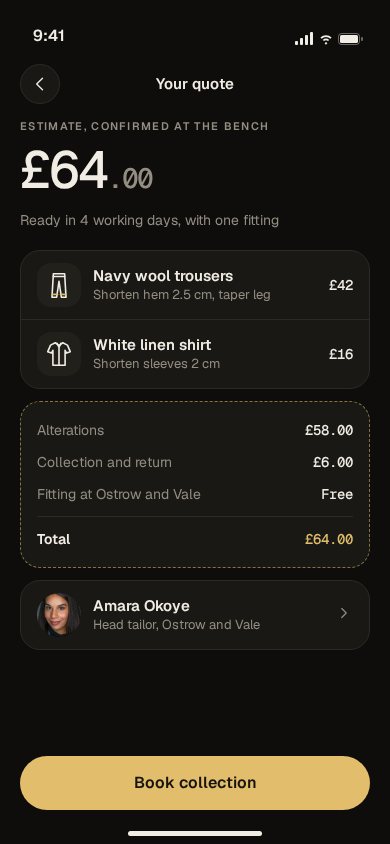
A detail screen from Hem, a lifestyle app template in a Minimal style. Screen 10 of 25.
Hem is a complete tailoring and alterations app: welcome and how it works, sign in, a home with the order at the bench and nearby tailors, choosing a garment and the work, a drawn hem length diagram, guided self measuring on a body diagram, a fit photo camera, a price quote, a tailor page, a collection slot picker, review and booking, live courier tracking on a map, tailor progress with notes and photos, a fitting appointment, delivery back with a handover code, orders, saved measurements with a waist trend, garment history, a Plus plan, notifications, profile and settings. Warm black and charcoal with chalk gold and bone white.
| Detail | Value |
|---|---|
| Screen type | Detail |
| App | Hem: Tailoring and alterations, collected |
| Category | Lifestyle |
| Design language | Minimal, dark |
| Type | Instrument Serif for headings, Geist for text |
| Colours | #0e0d0b background, #191814 surface, #f2ede4 text, #948d81 text-muted, #e2bd6b accent, #17140e accent-contrast, #22201b secondary, #2c2a24 border, #d9665a danger |
What this screen says
- Your quote
- Estimate, confirmed at the bench
- Ready in 4 working days, with one fitting
- Navy wool trousers
- Shorten hem 2.5 cm, taper leg
- White linen shirt
- Shorten sleeves 2 cm
- Alterations £58.00
- Collection and return £6.00
- Fitting at Ostrow and Vale Free
- Total £64.00
- Amara Okoye
- Head tailor, Ostrow and Vale
- Book collection
Around it in Hem
More detail screens
- Gavel Lot: Live online auctions
- Tidy Deep clean: Book home cleaners
- Dorm Property: Find student housing
- Lendly Item: Borrow things from neighbours
- Stub Artist: Fan to fan ticket resale
- Trove Idea: Visual ideas and boards
- Vidi Playlist: Video platform for creators
- Roll Photo info: Photo library and backups
- Splice Template: Video editor for short clips
- Blush Product: Beauty and makeup shopping
- Flatpack Product: Furniture store with room previews
- Column Publication: Newsletters and independent writers
Every lifestyle app detail screen
What makes a good detail screen
- Lead with what identifies the item. A large image or title, the price or status, and the key facts at the top. People should know they are in the right place at a glance.
- Keep the main action visible. A sticky bottom button for Add to cart, Book or Play stays reachable while people scroll through details.
- Order information by importance. The facts that decide the choice come first; reviews, specifications and fine print further down.
- Use progressive disclosure. Long descriptions, specifications and policies can expand on tap rather than filling the screen.
The full detail screen guide and every example
Remix Hem free: describe your own app and it is drawn in this design. Or get its files from $10: Figma, React Native, SwiftUI, Flutter and HTML.