Templates · List and feed screens · Lifestyle app · Inked
Inked Appointments screen
A list screen from Inked, a tattoo artists and bookings app template in a Dark-first style. Screen 16 of 25.
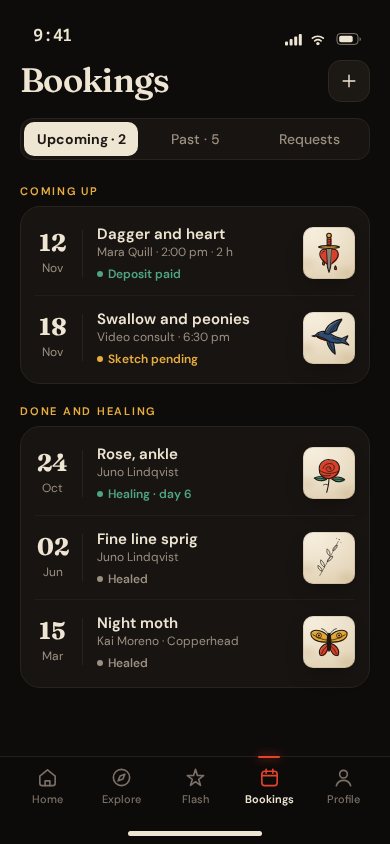
Inked is a complete tattoo app: welcome and style picks, sign in, a home with your next session and today's flash drop, explore and a studio map, artist pages with a portfolio, a healed piece, a flash sheet and a flash design, a stencil try on, a custom request, booking a slot, paying the deposit and the confirmation, appointments and session prep, messages with sketch approval, an aftercare tracker, your collection, notifications, Inked Plus, profile and settings. Warm ink black and bone with flash red, mustard and jade.
| Detail | Value |
|---|---|
| Screen type | List |
| App | Inked: Tattoo artists and bookings |
| Category | Lifestyle |
| Design language | Dark-first, dark |
| Type | Fraunces for headings, DM Sans for text |
| Colours | #0e0c0b background, #181411 surface, #efe5d3 text, #9a8f80 text-muted, #e5432c accent, #fff6ea accent-contrast, #efe4cf secondary, #2a231d border, #e8ad3f warning, #4fa386 success |
What this screen says
- Bookings
- Upcoming · 2 Past · 5 Requests
- Coming up
- 12Nov
- Dagger and heart
- Mara Quill · 2:00 pm · 2 hDeposit paid
- 18Nov
- Swallow and peonies
- Video consult · 6:30 pmSketch pending
- Done and healing
- 24Oct
- Rose, ankle
- Juno LindqvistHealing · day 6
- 02Jun
- Fine line sprig
- Juno LindqvistHealed
- 15Mar
- Night moth
- Kai Moreno · CopperheadHealed
- Home
- Explore
- Flash
- Profile
Around it in Inked
More list and feed screens
- Provenance Results: Authenticated luxury resale
- Gavel Auctions: Live online auctions
- Tidy Choose cleaner: Book home cleaners
- Dorm Saved: Find student housing
- Hem Orders: Tailoring and alterations, collected
- Lendly Party gear: Borrow things from neighbours
- Stub Listings: Fan to fan ticket resale
- Trove Boards: Visual ideas and boards
- Vidi Comments: Video platform for creators
- Roll Albums: Photo library and backups
- Splice Add media: Video editor for short clips
- Blush Lipstick: Beauty and makeup shopping
Every lifestyle app list screen
What makes a good list screen
- Show what people need to decide. Each row should carry just enough to choose: a title, one or two details and a status. Everything else belongs on the detail screen.
- Keep rows consistent. The same information in the same place on every row lets people scan down a column instead of reading each item.
- Group with headings. Dates, categories or status headings break long lists into chunks people can skip through.
- Make common actions quick. Swipe actions, a checkbox or a heart on the row save opening the item for small tasks.
The full list screen guide and every example
Remix Inked free: describe your own app and it is drawn in this design. Or get its files from $10: Figma, React Native, SwiftUI, Flutter and HTML.