Templates · Detail screens · Travel app · Hollow
Hollow Trail screen
A detail screen from Hollow, a cabin and boutique stays app template in a Luxury style. Screen 17 of 25.
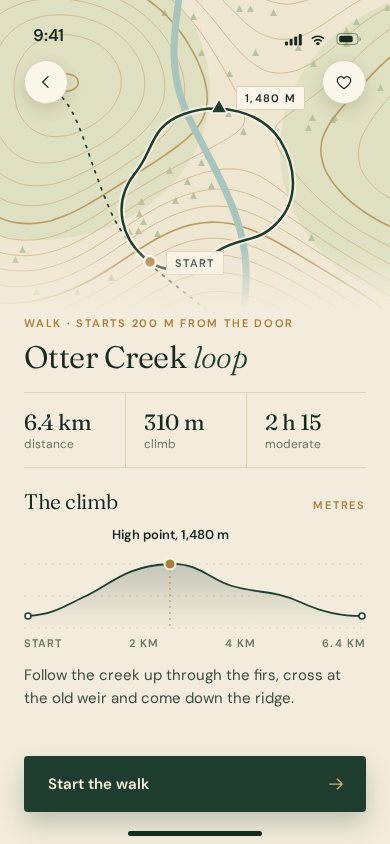
Hollow is a complete stays app: welcome, sign in and a code, an explore home with tall cabin cards, search, results, a contour map with price pins, a stay page, reviews, dates, guests, checkout and a booked screen, trips and a trip with arrival details, a host guidebook and a trail with its elevation profile, inbox and host chat, wishlists, a nights away dashboard, a membership, notifications, profile and settings. Forest green, cream and one brass throughout.
| Detail | Value |
|---|---|
| Screen type | Detail |
| App | Hollow: Cabin and boutique stays |
| Category | Travel |
| Design language | Luxury, light |
| Type | DM Sans |
| Colours | #f3ecdc background, #fbf6ea surface, #17281f text, #6d7566 text-muted, #1f3d2e accent, #f6efdf accent-contrast, #a8813f secondary, #ddd2b8 border, #a4442e danger |
What this screen says
- Start 1,480 m
- Walk · starts 200 m from the door
- Otter Creek loop
- 6.4 kmdistance
- 310 mclimb
- 2 h 15moderate
- The climb
- Metres
- High point, 1,480 m
- Start 2 km 4 km 6.4 km
- Follow the creek up through the firs, cross at the old weir and come down the ridge.
- Start the walk
Around it in Hollow
More detail screens
- Wheelhouse Trip request: Driver app for ride hailing
- Fuelup Station: Pay at the pump and car wash
- Omnia Restaurant: Super app for rides, food and payments
- Staya Listing: Homes and stays from local hosts
- Lodge Hotel: Hotels, deals and reservations
- Fare Flight: Flight search and price alerts
- Rove Attraction: Reviews and things to do
- Ignition Car: Car rental from local hosts
- Contrail Fares: Airline booking, check-in and boarding
- Keycard Hotel: Hotel stays, digital key and room service
- Detour Station: Community driving navigation
- Convoy Ride: Carpooling between cities
Every travel app detail screen
What makes a good detail screen
- Lead with what identifies the item. A large image or title, the price or status, and the key facts at the top. People should know they are in the right place at a glance.
- Keep the main action visible. A sticky bottom button for Add to cart, Book or Play stays reachable while people scroll through details.
- Order information by importance. The facts that decide the choice come first; reviews, specifications and fine print further down.
- Use progressive disclosure. Long descriptions, specifications and policies can expand on tap rather than filling the screen.
The full detail screen guide and every example
Remix Hollow free: describe your own app and it is drawn in this design. Or get its files from $10: Figma, React Native, SwiftUI, Flutter and HTML.